


Here is something no one talks about enough: Most apps do not fail because of a bad idea. They fail because the mobile app development process behind them lacked proper planning, scalability, UX thinking, or post-launch support.
We have worked with clients across industries who came to us after a previous agency delivered something that looked good in a demo but collapsed in the real world.
A checkout flow that broke under load.
A third-party integration that stopped working after an update.
An app that users downloaded once, never opened again, and uninstalled within a week.
These are not rare stories. They are the norm.
Around 80 to 90 percent of mobile apps launched in app stores are abandoned after a single use. The average app loses 77% of its daily active users within just three days of installation. After 30 days, the retention rate generally settles at around 7%.
What we have learned, through years of building apps for real clients with real users, is that post-launch failure is almost always traceable to something that was skipped or rushed in the process. This blog walks through how our mobile app development service approach mobile app development using a structured custom mobile app development framework designed for scalability, retention, and long-term product success.
How OpenSpace Services Develop Mobile Apps using a 7-Phase Model
Here’s a simple 7-phase model that we use when building mobile application for our clients. Let’s look at each phase in detail.
Phase 1: Discovery and Definition
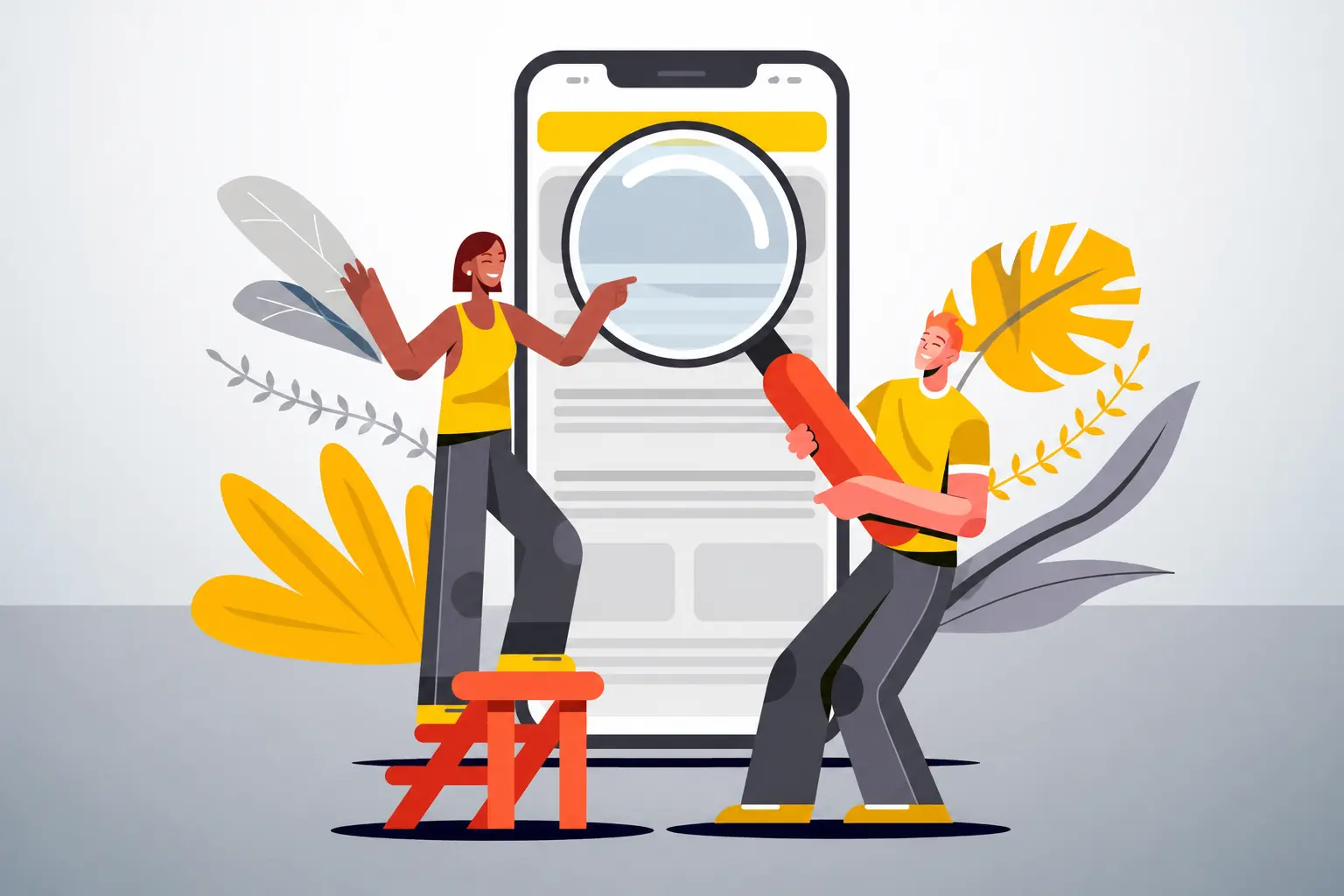
What we do: Requirement Understanding, Discovery & Research, Scope of Work Finalisation
Before we draw a wireframe or write a single line of code, our team spend significant time understanding the problem we are being hired to solve. This includes structured conversations with the client, competitive research, and a final scope of work document that all stakeholders agree to.
What this phase produces:
- A clear picture of who the end user is and what they actually need
- A competitive landscape review
- A detailed, agreed-upon scope document with features, platforms, timelines, and costs
Why Apps Fail Without This
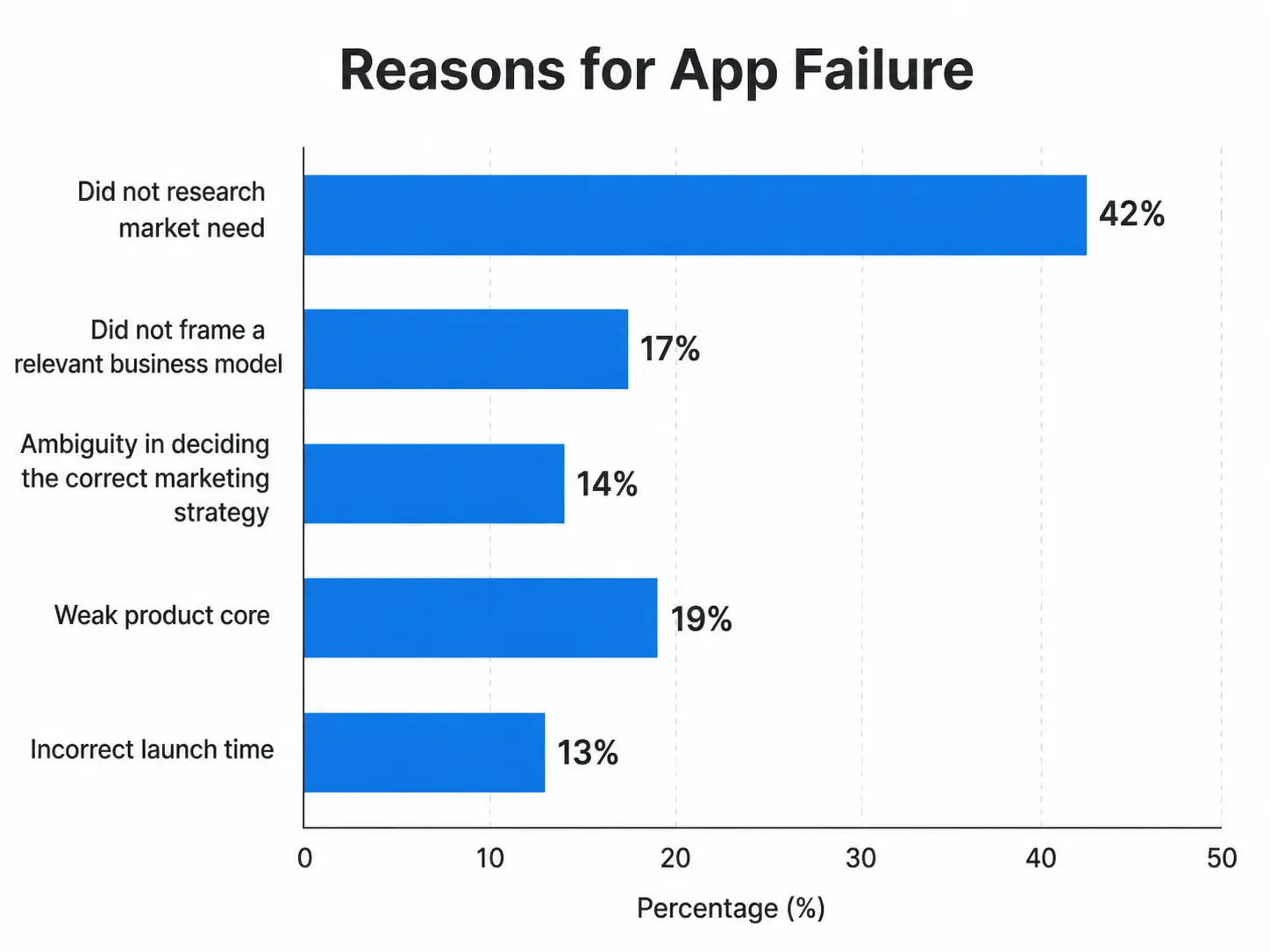
Skipping discovery is the single biggest reason apps miss the market entirely. Clients who skip this step often find themselves building something no one asked for. It also becomes one of the biggest reasons why mobile app development cost in 2026 spirals far beyond the original budget.
Most mobile apps are doomed from the start because they fail to understand the needs of their clients and client's target audience.
Common consequences of skipping discovery:
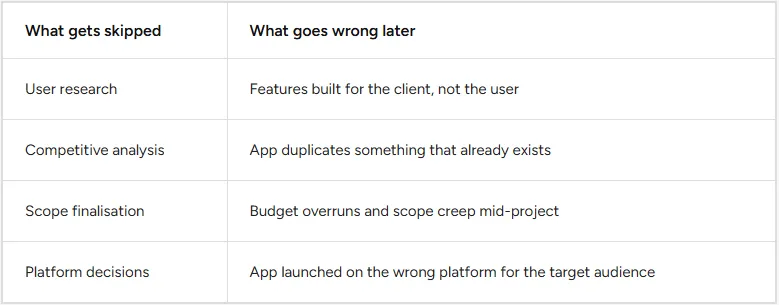
A study by McKinsey and Company showered that technology initiatives tend to go 45 percent over budget and 56 percent under-deliver on expected value. In most cases, this is a discovery problem, not a development problem.
At this stage, we do not rush. A week spent here saves months later.
Phase 2: Architecture and Design
What we do: User Flow & App Architecture, Wireframing, UI/UX Design
Once we know what we are building, we map out how users will move through the app, define the technical architecture, and design the interface. These three things happen in sequence, not in parallel.
User flows come first because they define logic. Wireframes come next because they define structure. Visual design comes last because it sits on top of both.
What this phase produces:
- Documented user flows covering all key journeys (including edge cases)
- Wireframes for every major screen
- Final UI/UX designs, complete with a design system
Why Apps Fail Without This
Poor UX is one of the most cited reasons for app abandonment. Strong onboarding and mobile app UX that retains users often determine whether users continue using an app beyond the first session. 21 percent of users abandon an app after their first use, and 71 percent of global mobile users admitted to deleting an app three months after download. (Source: Statista)
A lot of that abandonment traces back to confusing flows and weak first impressions, both of which are solved at the design stage, not the development stage.
The "pretty but broken" trap: Many apps look great in a demo but break down the moment a real user tries to complete a task. This happens when design used for aesthetics rather than problem-solving.
Things we specifically check in this phase:
- Does every user flow have a clear start, middle, and end?
- Are error states designed? Not just success states?
- Is onboarding fast? Apps that activate users within 3 minutes see nearly twice the retention rates.
- Is the navigation intuitive on both iOS and Android conventions?
Wireframes also serve as the contract between design and development. When a developer receives a wireframe, there should be no ambiguity about what they are building.
Phase 3: Technical Planning
What we do: Tech stack selection, scalability planning, security architecture, API strategy, third-party tool decisions
This is the phase that is most often skipped by mobile app company trying to move fast. And it is the phase whose absence causes the most dramatic failures after launch.
Technical planning is not the most exciting phase. There is no progress you can show to clients in the end of it. But it answers questions that will determine whether the app survives or breaks:
- What happens when 10,000 users open the app at the same time?
This becomes even more critical in AI-powered mobile app development, where backend infrastructure, inference speed, and scalability directly impact user experience.
- How do we handle data if a third-party API goes down?
- What does the database structure look like at scale?
- How do we handle security for user data?
- What is our update and versioning strategy?
Why Apps Fail Without This
An app built without technical planning is like a sandcastle. It may look stable, but all it takes is one wave to destroy it.
Consider this: 99.5% of consumer apps and about 87% of business apps fail. A significant portion of those failures are performance and scalability issues that were never thought through before development began.
When we document technical decisions before development starts, we are not slowing the project down. We are removing the most expensive mistakes from the later stages.
What gets decided in technical planning:
A huge part of scalable app success comes from choosing the right mobile app stack based on performance, scalability, and long-term maintenance requirements.
- Frontend and backend frameworks
- Database architecture
- Authentication and security protocols
- API design and third-party integration strategy
- Hosting, cloud infrastructure, and scaling approach
- CI/CD pipeline setup
- Monitoring and alerting systems
Phase 4: Development and Integrations
What we do: App Development, API & Third-Party Integrations
With discovery done, designs finalised, and a technical plan in place, development begins. This is where the actual product gets built.
Our custom mobile app agency builds in sprints. Each sprint has a defined set of deliverables, and the client sees working software regularly rather than waiting months for a big reveal. This matters because feedback caught in sprint 3 costs a fraction of what it costs to fix in sprint 10.
Third-party integrations happen in parallel with development, but they are treated as a separate risk area. Payment gateways, maps, push notifications, analytics tools and any other external dependency each gets its own integration testing.
Why Integrations Specifically Cause Post-Launch Failures?
Most developers test the happy path: what happens when everything works. The real failures come from what happens when things do not.
An app would likely crash due to technical inefficiencies: poor memory management, software lifecycles and technical debt, inadequate testing, and poor performance monitoring.
The integration time bomb: Third-party APIs change. They deprecate endpoints. They go down. They introduce breaking changes without warning. An app that was not built with fallbacks and error handling for these scenarios will fail in front of users.
Our approach to integrations:
- Every integration has a fallback or graceful failure state
- API responses are validated, not assumed
- Rate limits are built into the architecture from the start
- Webhooks and async processes are tested for failure, not just success
- All keys, tokens, and secrets are stored securely, never in code
The goal during development is not just to make things work. It is to make them work reliably under conditions that the developer did not anticipate.
Phase 5: Testing and Quality Assurance
What we do: Internal Testing, Client Review, Quality Assurance, User Acceptance Testing
Testing is not a single event at the end of development. It runs throughout. But this phase represents the structured, formal validation of the entire product before it goes to users.
We run four types of testing in sequence:
1. Internal testing by the development team. Every feature is tested on real devices, not just simulators.
2. Client review where the client tests the app against the agreed scope. This is not just showing a demo. It is handing the client a test build and asking them to try to break it.
3. Quality Assurance by a dedicated QA team. This includes regression testing, performance testing, security testing, and compatibility testing across device and OS combinations.
4. User Acceptance Testing (UAT) with a small group of real intended users. This answers a question no internal team can: does this app actually work for the people it was built for?
Why Apps Fail Without Rigorous Testing
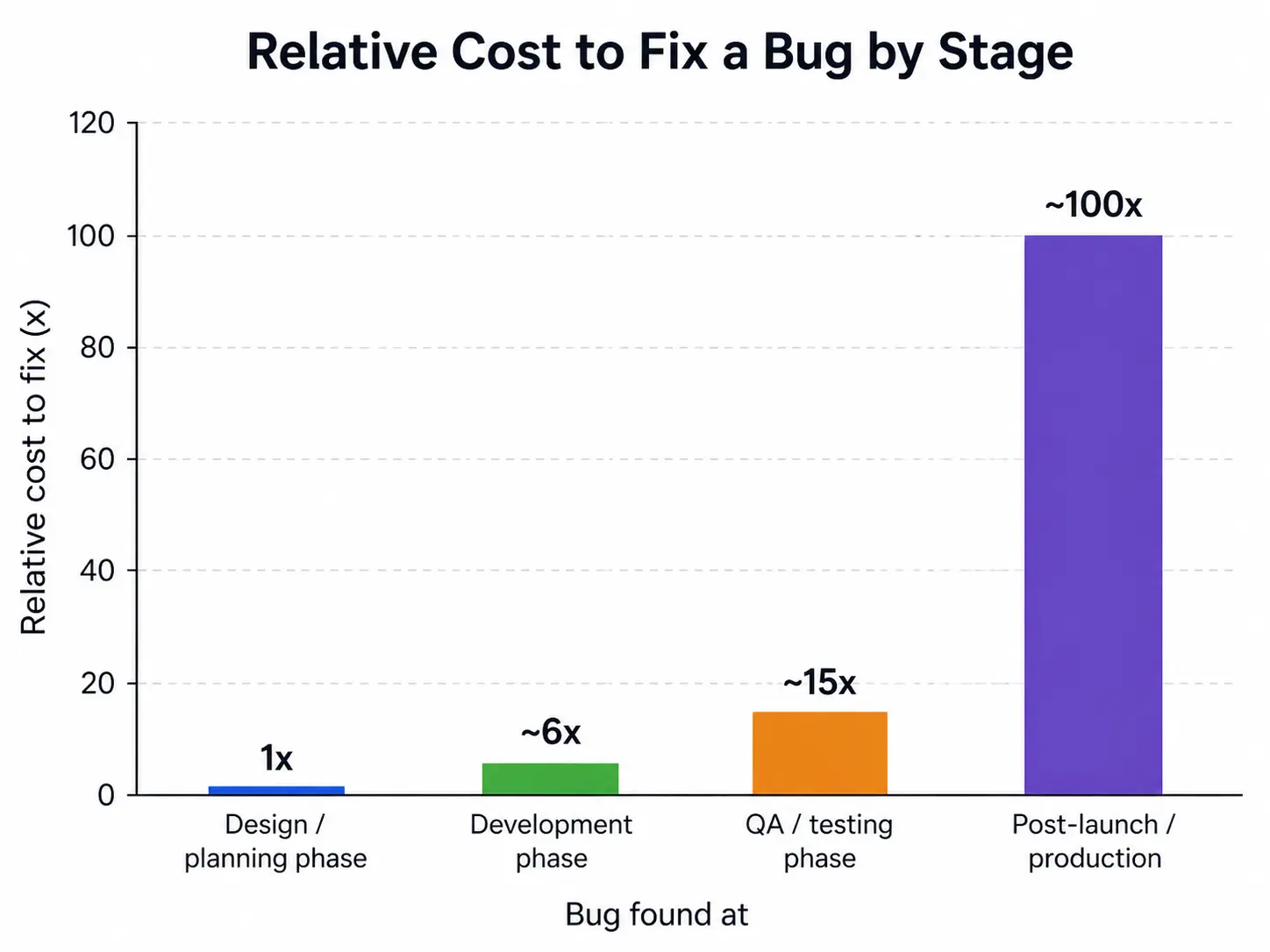
A bug fixed during the design phase is 100 times cheaper to resolve than the same bug found in a production environment.
What our QA phase specifically covers:
- Functional testing: Does every feature do what it is supposed to do?
- Edge case testing: What happens with no internet, empty states, invalid inputs?
- Device and OS testing: iOS 15, 16, 17 and the top Android devices and versions
- Performance testing: Speed, battery usage, memory consumption
- Security testing: Data exposure, injection vulnerabilities, authentication flaws
- Accessibility testing: Font scaling, contrast ratios, screen reader compatibility
UAT is non-negotiable. No matter how well internal teams test, real users will always find something unexpected. Better to find it before launch.
Phase 6: Launch Readiness
What we do: Deployment Preparation, App Launch
A lot of agencies treat "launch" as the finish line. You submit to the app store, and you are done. In reality, the weeks before launch are where some of the most critical work happens.
Deployment preparation includes:
- App Store Optimisation (ASO), which icludes adding screenshots, descriptions, keywords, preview videos.
- App Store and Google Play submission preparation, including compliance with both stores' guidelines.
- Production environment setup and final performance benchmarking.
- Rollback plan documentation. If something breaks on launch day, what do we do?
- Staged rollout plan where instead of releasing the app for 100% of users at once, we release it in stages
- Analytics and crash reporting tools, live and tested before launch
Why Apps Fail at Launch Even When the Build is Good
"Day-one disasters" are more common than most people think. An app can be technically sound and still fail at launch because deployment was not treated as its own discipline.
Common launch-day failures:
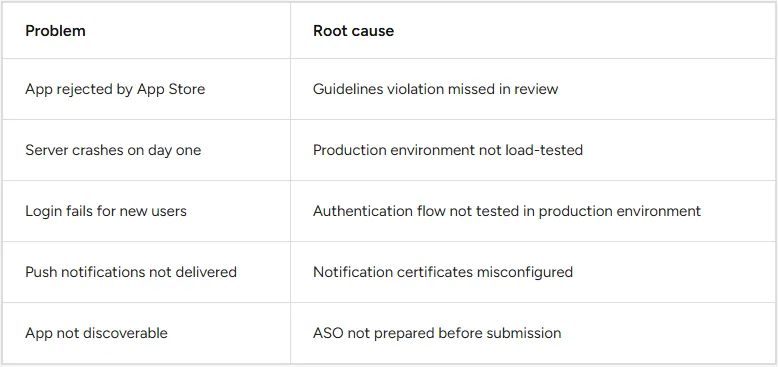
There is no recovering from a bad week-one reputation.
A staged rollout is one of the most underused tools in app launches. Instead of releasing to every user at once, we release to 5%, then 20%, then 50%, then 100%. This gives us time to catch issues under real load before they affect the full user base.
Phase 7: Handover, Support, and Continuity

What we do: Training & Handover, Post-Launch Support, Maintenance & Future Updates
This is where many projects are simply abandoned. The agency ships the app, the handover is a 30-minute call, and then the client is on their own. Six months later, the app has not been updated, a dependency has broken, and the OS has released a new version that introduces visual bugs.
We call this the "orphaned app" problem. And it is one of the most preventable causes of long-term app failure.
What handover means
Handing over an app is not just giving someone a GitHub link. It includes:
- Documentation: Technical documentation covering architecture, dependencies, deployment process, and known limitations
- Training: The client's team knows how to use the admin panel, push updates, read analytics, and respond to user feedback
- Knowledge transfer: The development team walks the client through what was built, why decisions were made, and what to watch for
Post-launch support
The first 90 days after launch are the most critical. Most apps fail within the first 90 days of going live. During this period, user behaviour data starts to accumulate and the real picture of how people use the app emerges. Issues surface that no amount of pre-launch testing could predict.
Our post-launch support covers:
- Bug fixes for issues discovered in production
- Performance monitoring and alerting
- User feedback analysis and prioritisation
- Crash report triage
What happens without ongoing maintenance:
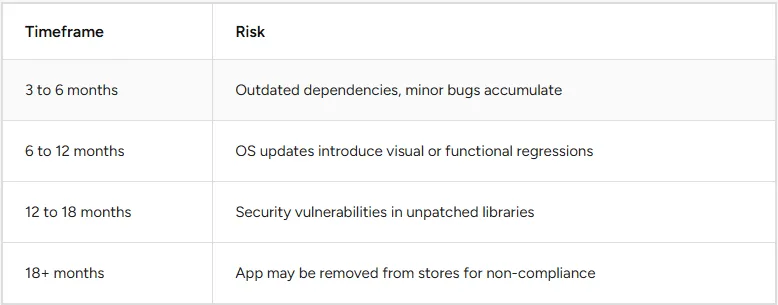
A good app is never "done." It is a living product. The clients we have seen succeed long-term are the ones who treat maintenance as part of the product budget, not an afterthought.
Putting It Together: Why Process Matters More Than Talent
Talented developers can still build apps that fail if they skip the steps that protect against failure. A less glamorous truth about app development is that most of what determines post-launch success happens outside the code editor.
Here is a summary of where the highest risks sit and which phases address them:
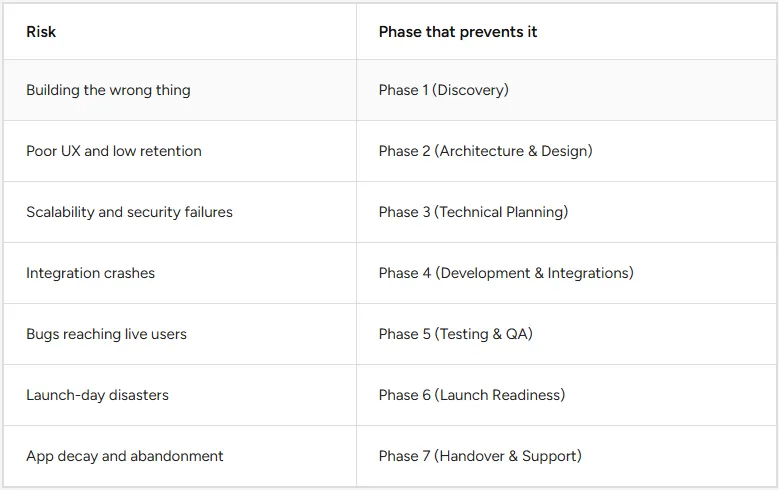
Working with clients across industries, the pattern we see repeatedly is this: the apps that survive and grow are the ones where every phase was treated as important. Not just development. Not just design. Every single phase.
The apps that fail are almost always missing one or more of these. And in hindsight, the clients almost always know which step they rushed.
Looking to hire mobile app developers that develop scalable apps? OpenSpace Services can help.
Our mobile app development team follow this exact structured 7-phase process, from in-depth research to post-launch maintenance, so nothing critical gets skipped. We focus on building apps that are stable, scalable, and built for real users, not just demos. Partner with OpenSpace Services to create an app that does not fail after launch.