

Quick answer: Healthcare mobile app development services cover design, development, security, integration and support for apps that handle health information. A good healthcare app does three things well. It keeps data protected, it meets the rules that apply to it, and it's simple enough for any patient to use without help.
Patients already manage banking, shopping and travel from their phones. 91% of US adults own a smartphone, according to the Pew Research Center. They now expect the same ease from their healthcare.
This guide covers what a healthcare app needs, which rules shape it, and how to work with a partner to build one.
What Kinds of Healthcare Apps are Businesses Building Today?
Most healthcare apps fall into four groups: patient apps, provider apps, corporate wellness apps and diagnostic apps. The type decides who uses the app, what data it holds and which rules apply. So it's the first decision to make.
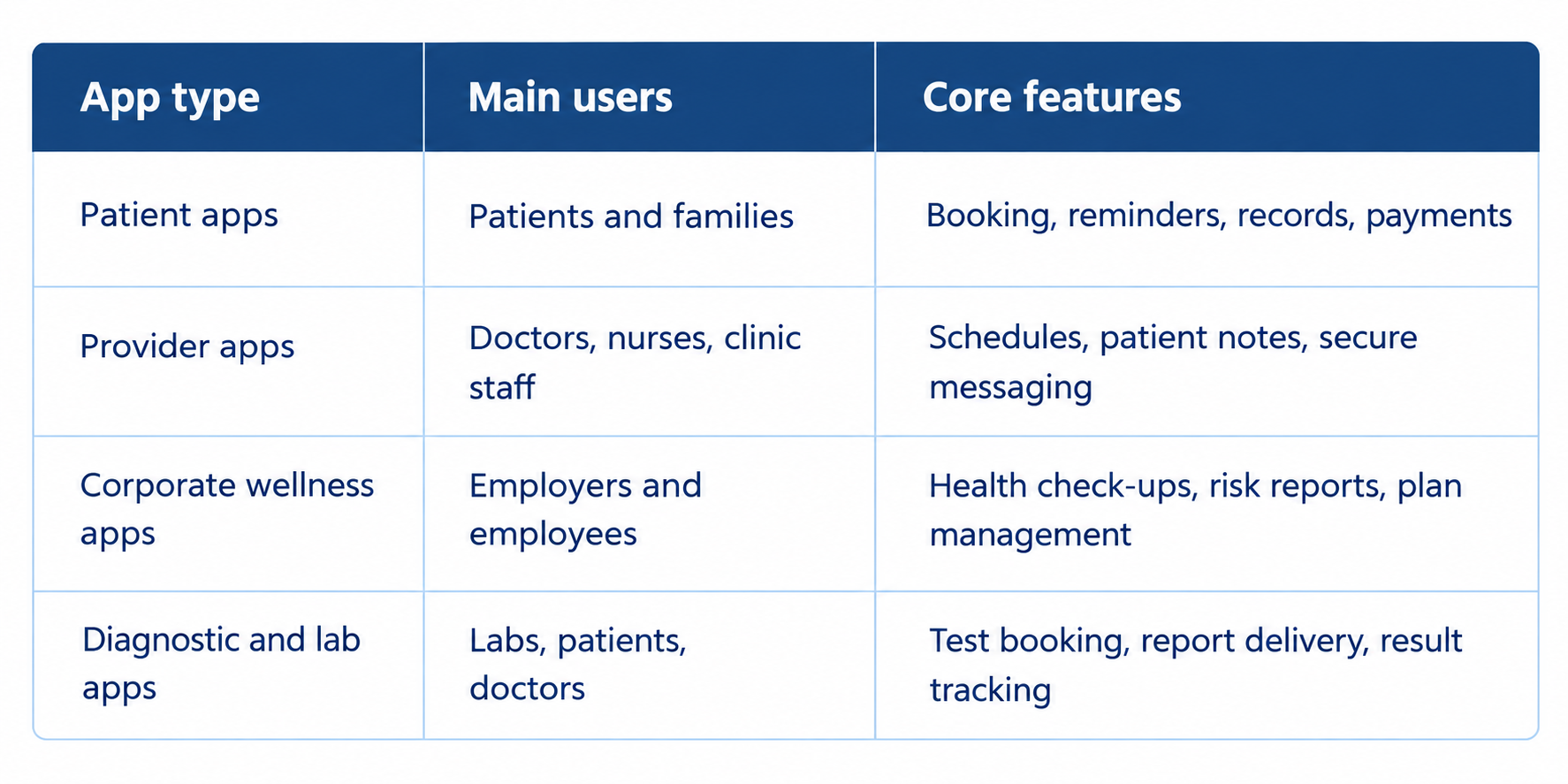
Many successful products combine two groups. A wellness app, for example, often serves both employees and the HR team that manages their plans.
Which Rules Apply to Your Healthcare App?
The rules depend on who runs the app and what data it handles. HIPAA applies to many apps, but not all. Knowing which rules fit your app early on makes the build simpler and avoids rework later.
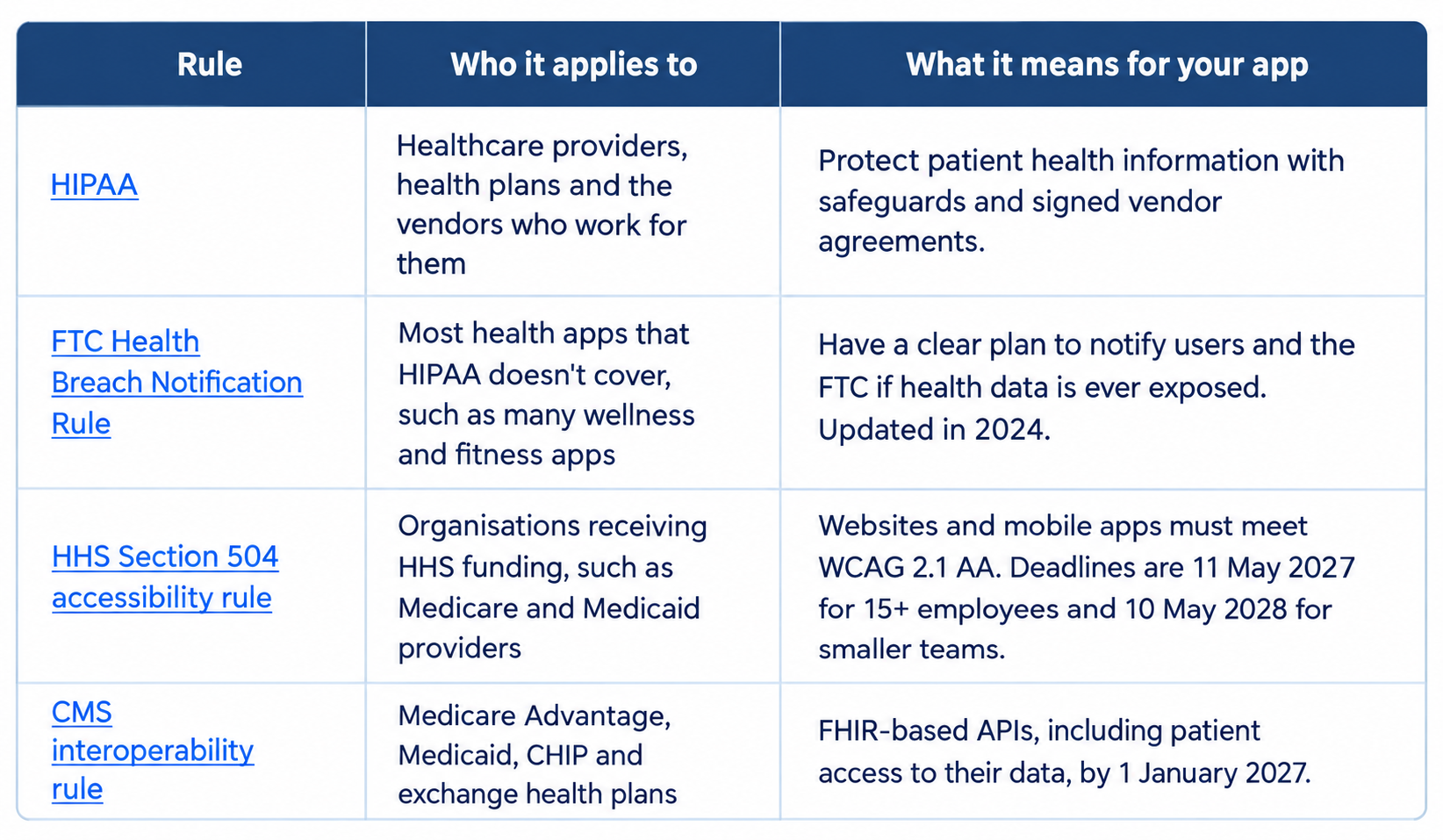
The last rule is good news for app builders. More health plans now offer standard APIs, so apps can connect to patient data more easily. Always confirm your app's exact position with your legal team.
What Makes a Healthcare App Patient-Friendly?
A patient-friendly app works for everyone, including older users, people with disabilities and people who feel unwell. That means clear screens, simple steps and plain words. If a patient needs help to book an appointment, the design needs another look.
- Accessible by default: Readable text sizes, strong contrast, large tap targets and screen reader support, in line with WCAG 2.1 AA
- Few steps: Book an appointment or reorder a test in three or four taps
- Plain language: "Blood sugar test" before "HbA1c," with the medical term alongside
- Helpful reminders: For appointments and medicines, and easy to switch off
- Offline access: Key records and upcoming appointments readable without a signal
- Separate journeys: Different logins and home screens for patients, carers or corporate users
Patient-friendly design should be tested with the people who will actually use the app. Simple navigation, clear onboarding, readable content, and fewer unnecessary steps can make it easier for patients to complete important tasks. Explore our guide to mobile app UX and onboarding for practical ways to reduce friction during the first session.
Building accessibility in from the first design is far easier than adding it later. It also puts you ahead of the HHS deadlines.
How do You Keep Patient Data Secure in a Mobile App?
Security is built into each layer of the app, from the login screen to the server. A good partner treats these items as the standard build, not optional extras.
- Encryption: Data protected in storage and while it travels between the app and the server
- Secure documents: Encrypted upload and download of reports and prescriptions
- Role-based access: Each user sees only the data their role needs
- Strong login: Multi-factor sign-in, plus biometrics such as Face ID where it suits users
- Secure payments: A trusted payment gateway, so card details never sit in your app
- Audit logs: A record of who viewed or changed what, and when
Testing matters as much as design. Security checks should run before launch and after every major update.
How Does a Healthcare App Connect to Existing Systems?
Most healthcare apps need to talk to other systems: health records, labs, payment gateways and insurers. Good integrations mean patients and staff don't enter the same data twice.
- Health records (EHR): Often through FHIR, the standard format for sharing health data
- Labs and diagnostic centres: For booking tests and receiving results
- Payment gateways: For consultations, packages and subscriptions
- Messaging: SMS, email or WhatsApp for reminders and updates
Lab reports are a common challenge, because every lab formats them differently. We built an AI-powered system that turns diagnostic PDFs from many labs into structured data in under a minute. Patients see their results in the app without anyone retyping them.
What Does this Look Like in Practice?
Here are two healthcare products we've built, both serving patients and corporate clients.
MyHealthMeter offers corporate health check-ups across more than 400 cities. We built its app in React Native, so it runs on both iOS and Android from one codebase. Patients find nearby centres by pin code, book tests, pay through PayU and store their reports securely. Individual users and corporate clients each get their own login and journey.
Quantum CorpHealth serves more than 500 corporate clients. We built a platform with a secure medical locker, appointment booking, health packages and WhatsApp updates. Corporate clients saw a 30% rise in employee adoption of health packages. Service delivery with partner diagnostic centres became 25% faster.
For businesses choosing a cross-platform approach, our guide to choosing a mobile app technology stack explains how to evaluate React Native, Flutter, and native development against product requirements, performance, and long-term maintenance.
What Should Healthcare Mobile App Development Services Include?
Full mobile application development services for healthcare cover the whole journey, from planning to support after launch. Compliance and security run through every stage, not just the end.
- Discovery: Users, features and the rules that apply to your app
- Design: Accessible screens, tested with real patients where possible
- Development: Native or cross-platform, with secure APIs and integrations
- Testing: Functional, security and accessibility testing on real devices
- Launch: App Store and Google Play submission, including health data disclosures
- Support: Updates, monitoring and new features as needs change
Not every business needs a fully custom build. If a standard booking or telehealth tool already fits your workflow, start there. Custom mobile app development services make sense when you need your own patient journey, deep integrations or a branded experience. Our guide to mobile app development costs helps with budget planning.
How do You Choose a Healthcare App Development Partner?
Look for real healthcare experience, a clear approach to compliance and honest advice. The quickest test is the questions you ask on the first call.
When comparing mobile app development services USA providers, including us, ask:
- Which healthcare apps have you built, and can we see them?
- How do you decide which rules apply to our app?
- How do you test for accessibility?
- Will we own the code, the data and the app store accounts?
- Which part of a past healthcare project would you do differently today?
- When would you tell us not to build a custom app?
The last two questions are the hardest to answer well. Strong mobile app development company services come with honest answers to both.
What Should You do First?
Write down the one task your patients or staff find hardest today. Maybe it's booking, getting results or managing a plan. Then list who does it and how often. That single journey is the best place to start, whatever partner you choose.
When you're ready, our team offers mobile app development services built around mobile app development for business goals, from first design to ongoing support. Talk to our team about your healthcare app.