


Strapi works exceptionally well at small to mid-scale, but performance issues often appear once deployments cross 200k–500k records or experience sustained high traffic.
Did you know? 65% of developers report performance degrading noticeably once a Strapi instance crosses 500,000 records even on well-provisioned hardware.
Slow APIs, high database CPU usage and poor Strapi performance optimization practices are common symptoms of poor scaling architecture.
The problem usually is not Strapi itself. Most bottlenecks come from unindexed database queries, excessive populate calls, missing caching layers, lack of connection pooling, or infrastructure that was never designed for enterprise workloads.
For teams evaluating Strapi enterprise deployments, the key questions remain the same:
- Can it really handle 1 million records?
- How does Strapi scalability actually work under load?
- Is self-hosted the right call?
This guide answers all of that with architecture frameworks, a real OSSPL case study, and a load testing checklist you can act on today.
TL; DR
- Strapi can handle 1M+ records but only with deliberate database indexing, pagination, and query optimization.
- Unindexed columns and deeply nested populate queries are the #1 performance killer at scale.
- A Redis + CDN + REST Cache Plugin stack can reduce API response times by 60–80%.
- PostgreSQL (with PgBouncer connection pooling) is the only production-ready database option for strapi enterprise deployments.
- For large-scale deployments, self-hosted infrastructure gives you the control you need; Strapi Cloud suits teams without dedicated DevOps.
- Load testing with k6 or Artillery before go-live prevents production surprises at scale.
- When symptoms persist beyond config fixes, bringing in a Strapi performance specialist saves months of debugging.
When Does Strapi Start Struggling?
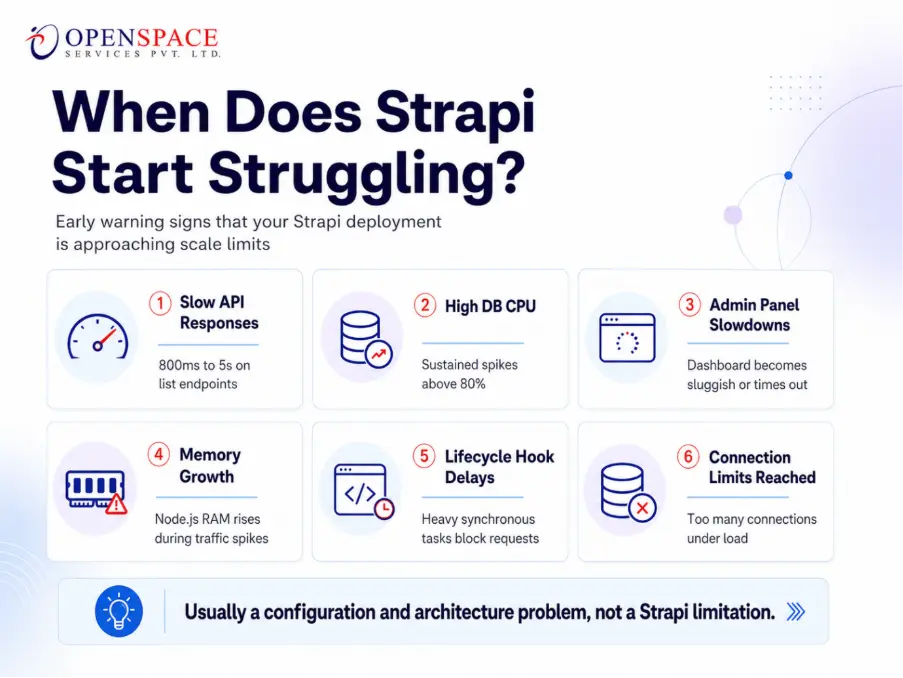
Strapi begins showing performance degradation when record counts exceed ~200k–500k without proper indexing, when concurrent users exceed 100 without horizontal scaling, or when API queries use deep nested populate without field selection.
The symptoms are predictable and fixable; if caught early.
These are the early warning signs that your Strapi deployment is approaching its limits:
- Slow API Responses
API requests start taking longer than 800ms, especially list endpoints that may slow to 1–5 seconds due to unindexed database queries.
- High Database CPU Usage
CPU usage consistently spikes above 80%, often caused by inefficient queries or excessive data fetching.
- Admin Panel Slowdowns
The Strapi admin dashboard becomes sluggish or times out when handling large datasets.
- Increasing Memory Usage
The Node.js process consumes more RAM during traffic spikes and does not release memory efficiently.
- Lifecycle Hooks Causing Delays
Heavy synchronous tasks inside lifecycle hooks can slow down request processing.
- Database Connection Limits Reached
Errors like “too many connections” appear under load, usually due to missing connection pooling.
These problems usually do not mean Strapi is the wrong platform. In most cases, they are architecture and configuration issues. Strapi’s architecture is capable of scaling well, but it needs proper optimization and infrastructure planning as usage grows.
Strapi Performance Bottlenecks: What’s Actually Causing the Slowdown?
Before scaling infrastructure further, understand what actually limits Strapi scalability in production. This table maps the most common root causes to their impact level and fix priority:
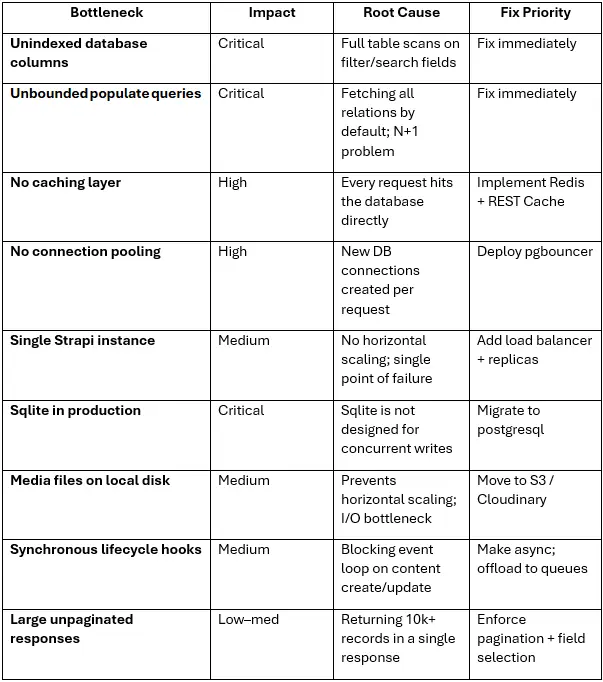
Strapi acknowledged in late 2025 that the community’s top-voted issues aren’t new features; they’re reliability and performance fundamentals. The good news: the v5 series has shipped significant stability improvements to address exactly these patterns.
Related read: Strapi v4 to v5 Migration: What Broke, What Changed, and How to Upgrade Without Losing Data
How Should You Optimize Your Database for a Large Strapi Project?
Database optimization is the highest-leverage action for strapi performance optimization at scale. Here’s what actually moves the needle:
1. Add Indexes on Filtered Fields
Every column used in ?filters, ?sort, or relation joins needs a database index. Without one, PostgreSQL performs a full-table scan.
2. Use PgBouncer for Connection Pooling
Strapi opens a new DB connection per request by default. PgBouncer proxies connections, dramatically reducing connection overhead under high concurrency.
3. Constrain populate Depth
Always specify which fields and relations to populate. Avoid populate=* in production — it's the single most common cause of query explosion at scale.
PostgreSQL remains the recommended database for enterprise Strapi deployments due to its robust feature set and proven scalability. Never use SQLite in production as it lacks the concurrency model needed even at moderate traffic.
What Caching Strategies Actually Work for High-Traffic Strapi?
Caching is where the biggest performance gains live. Enterprise CMS platforms targeting an 80–95% cache hit ratio achieve sub-100ms response times on cached endpoints. Here's the stack that delivers it:
Layer 1: Redis Application Cache
Redis delivers sub-millisecond response times for cached data and supports up to 200 million operations per second. Integrate it via ioredis the lifecycle hooks for automatic cache invalidation on content update. The Strapi REST Cache Plugin handles GET request caching automatically.
Layer 2: CDN for Public API Responses
Static and semi-static content types (landing pages, product catalogs, news articles) should be served from the edge. Configure Cloudflare or AWS CloudFront with appropriate Cache-Control headers. Cache invalidation on publish events can be wired directly via Strapi lifecycle hooks.
Layer 3: API Response Caching
Set sensible TTLs per content type. Product listings might cache for 5 minutes; live event data for 30 seconds. The key insight: not all endpoints need the same caching strategy. Segment by content freshness requirements.
Also Read: The Complete Beginner’s Guide to Strapi CMS in 2026: Architecture, Setup & What to Build First
Strapi Cloud vs Self-Hosted: Which Is Right for Enterprise Scale?
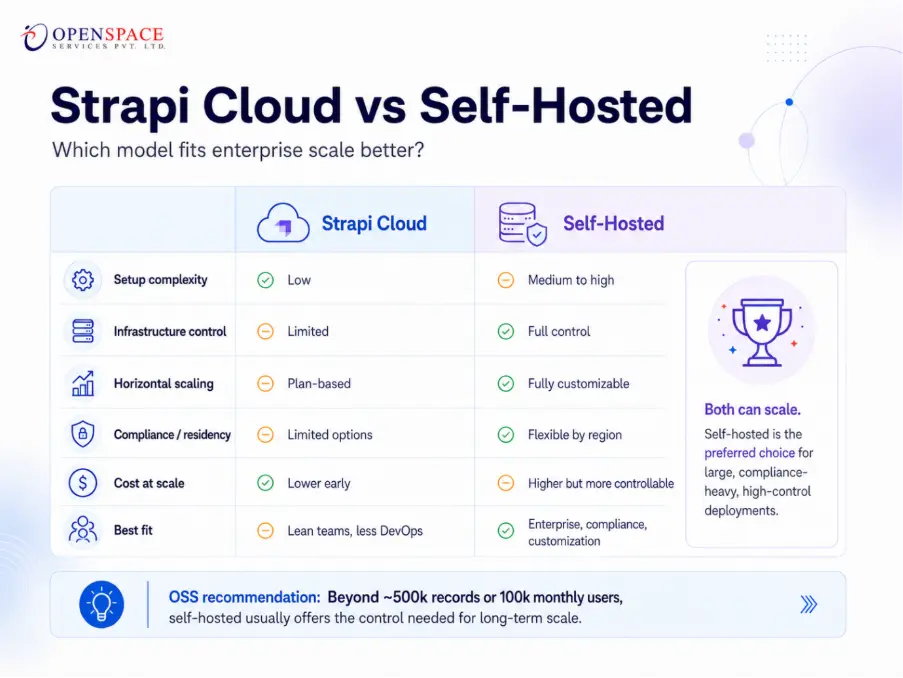
This is the question every enterprise architect asks. The honest answer is that both can scale but they make different tradeoffs.
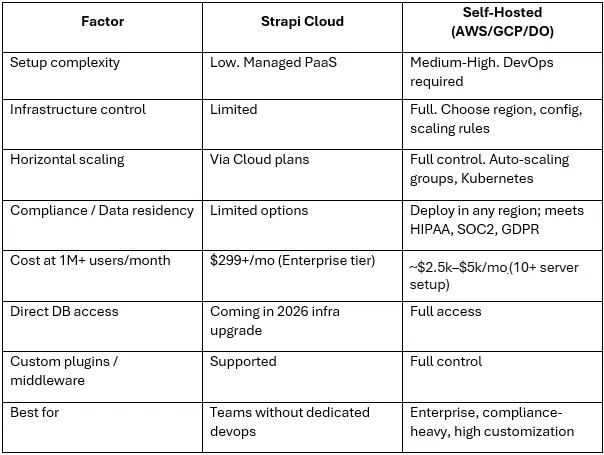
We at OpenSpace Services always tell our clients for Series A/B startups scaling beyond 500k records or 100k monthly users, self-hosted on AWS or GCP with a stateless Strapi setup (Redis for session state, S3 for media) gives you the control needed without vendor lock-in. Strapi Cloud is excellent for smaller teams and early-stage projects where DevOps bandwidth is scarce.
The OpenSpace Services Strapi Scale-Readiness Framework
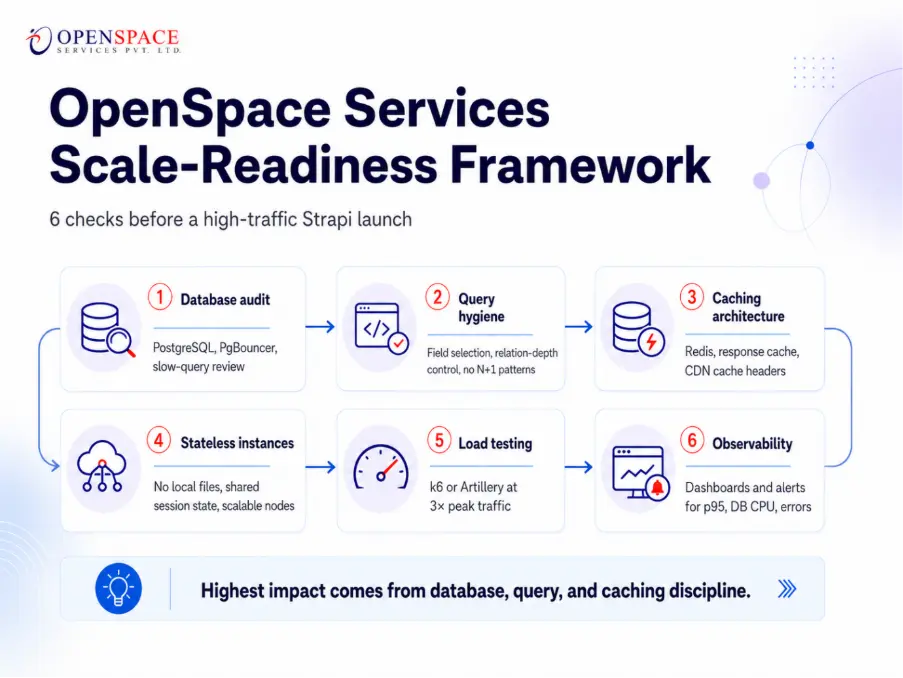
At OpenSpace Services, we've developed an internal checklist for auditing client deployments before high-traffic launches. It's organized in order of impact:
Strapi Scale-Readiness Framework
- Database Audit: Confirm PostgreSQL with PgBouncer. Run
EXPLAIN ANALYZEon the 10 slowest queries. Index every filtered/sorted column. - Query Hygiene: Audit all
populatecalls. Enforce field selection on public-facing endpoints. Eliminate N+1 queries via Strapi's query engine. - Caching Architecture: Deploy Redis for application caching. Configure REST Cache Plugin with content-type-specific TTLs. Set CDN cache headers for public endpoints.
- Stateless Instance Configuration: Ensure all Strapi nodes are stateless (no local file storage, session via Redis). Configure PM2 cluster mode or Kubernetes horizontal pod autoscaling.
- Load Testing: Run k6 or Artillery against the top 10 API endpoints at 3× expected peak traffic. Monitor for error rates, memory leaks, and DB connection exhaustion.
- Observability: Set up Datadog or New Relic with Strapi-specific dashboards. Alert on p95 response time > 500ms, DB CPU > 70%, error rate > 0.5%.
How OpenSpace Services Scaled Strapi CMS for a High-Volume Real Estate Platform
ANAROCK, a globally recognized leader in real estate consultancy, required a CMS infrastructure capable of managing a vast network of channel partners and developer relationships. Their existing CMS struggled with search and filter performance as their content database scaled.
We implemented a Strapi-powered headless CMS with PostgreSQL as the primary database, Redis-backed API response caching, and a stateless multi-instance deployment on cloud infrastructure.
Field selection and relation depth controls were enforced across all public-facing API endpoints, reducing average query time significantly.
Media was migrated from local disk to a cloud object store to enable horizontal scaling.
The result: a reliable, scalable CMS platform capable of supporting the organization's growth across channels and markets.
To know about this client in detail, read our ANAROCK case study.
How to Load Test Your Strapi Instance Before It Goes Live at Scale?
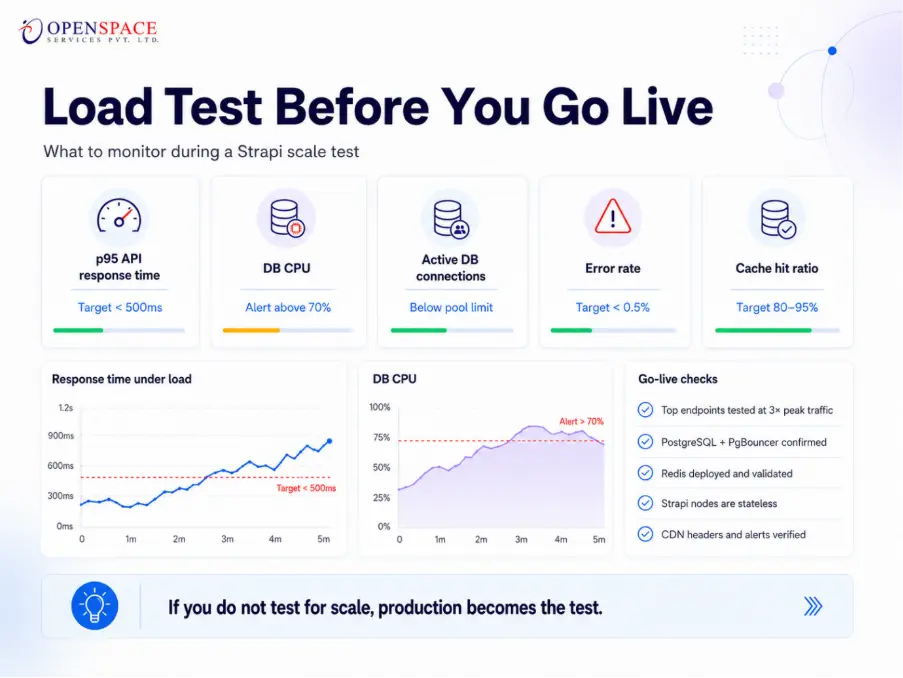
Load testing is non-negotiable for any Strapi CMS for large scale deployment. Here's a production-ready checklist:
What to Test
- Top 10 most-used API endpoints (list + detail views)
- Concurrent authenticated and unauthenticated requests
- Content creation/update endpoints (write load)
- Media upload and delivery throughput
- GraphQL queries with deep relation traversal (if using GraphQL)
Tools to Use
- k6: scriptable, developer-friendly, integrates with CI/CD
- Artillery: YAML-based test scenarios, good for complex flows
- Locust: Python-based, good for custom user simulation
Metrics to Monitor During Tests
- p50 / p95 / p99 API response time (target: p95 < 500ms)
- Database CPU utilization (alert above 70%)
- Active DB connections (should stay below pool limit)
- Node.js memory usage (watch for unbounded growth)
- HTTP error rate (target: < 0.5% at peak load)
- Cache hit ratio (target: 80–95% for public endpoints)
Final Readiness Checklist
- All critical API endpoints tested at 3× projected peak concurrent users
- PostgreSQL + PgBouncer confirmed; connection pool sized correctly
- Redis deployed and cache hit ratio verified ≥ 80%
- Strapi instances are stateless (no local file dependencies)
- Load balancer configured with health checks on all Strapi nodes
- Observability dashboards live with alerting configured
- CDN cache headers validated on public content endpoints
Strapi notes that platforms handling over one million monthly visitors have done so stably but only with architecture designed for it upfront.
When Should You Bring in a Strapi Performance Specialist?
Configuration guides can take you far. But there are specific inflection points where bringing in a specialist pays for itself many times over:
- You’ve applied standard optimizations and p95 response time is still > 1 second
- You’re approaching or exceeding 1 million records and planning multi-region expansion
- You need a Strapi architecture that meets SOC2 / HIPAA / GDPR compliance
- You’re migrating from WordPress or a legacy CMS to Strapi at scale (content + SEO risk)
- You need Strapi integrated with a CRM, ERP, or custom microservices layer
- Your team doesn’t have dedicated DevOps capacity to manage self-hosted infrastructure
At OpenSpace Services we provide Strapi CMS development, integration, and performance optimization services for enterprises and scaling startups including headless CMS builds, migration projects, and ongoing managed performance audits.
Final Thoughts
Strapi can absolutely power enterprise-grade platforms with millions of records and high concurrent traffic but scale does not happen automatically. The difference between a sluggish CMS and a fast, resilient architecture comes down to database design, caching strategy, infrastructure planning, and proactive load testing. Teams that optimize early avoid expensive rebuilds later. Whether you are scaling a startup platform or modernizing enterprise content operations, the right architecture decisions matter from day one.
If your team is planning a large-scale Strapi deployment or facing performance bottlenecks already, get a free 30-minute Strapi performance audit from the OpenSpace Services team.