


Most companies do not switch their CMS because they want to. They switch because they have to after months of developer bottlenecks, missed launches, and a content system that cannot keep up with the business.
Strapi and Next.js solve this. Many scaling businesses now invest in enterprise Strapi CMS development services to improve content flexibility and frontend scalability. Together, they give your team a flexible, scalable foundation where content, development, and deployment stay independent from each other.
In this blog, we will cover what a production-ready integration looks like in 2026, across architecture, auth, data fetching, media, webhooks, and deployment. We will also talk about where complexity tends to build, so you know what to plan for.
1. Why Strapi + Next.js in 2026
Businesses evaluating why companies migrate to Strapi CMS are increasingly prioritizing ownership, scalability, and API flexibility. Strapi is an open-source, self-hosted headless CMS. You own your data, your infrastructure, and your customisation layer.
Next.js is a React meta-framework with mature support for static rendering, server rendering, and incremental updates.
The combination matters because it removes the two constraints that slow most digital teams down:
- Content teams waiting for developers to make changes
- Development teams blocked by a CMS that dictates how the frontend must work
With Strapi handling content and Next.js handling presentation, both teams work independently.
Strapi v5 and Next.js 15 are the versions to build for today’s requirements.
- Strapi v5 brings a new Document Service API, full TypeScript support, and improved draft and publish workflows.
- Next.js 15 adds stable Server Actions, more explicit caching controls, and React 19 compatibility.
If you are evaluating Strapi against Contentful, Sanity, or WordPress headless, the deciding factor is usually ownership and control. Strapi gives you both.
Contentful and Sanity are cloud-only with usage-based pricing that scales with your content. WordPress headless works, but it does carrie the weight of the WordPress ecosystem.
2. Architecture Decisions That Define Your Ceiling
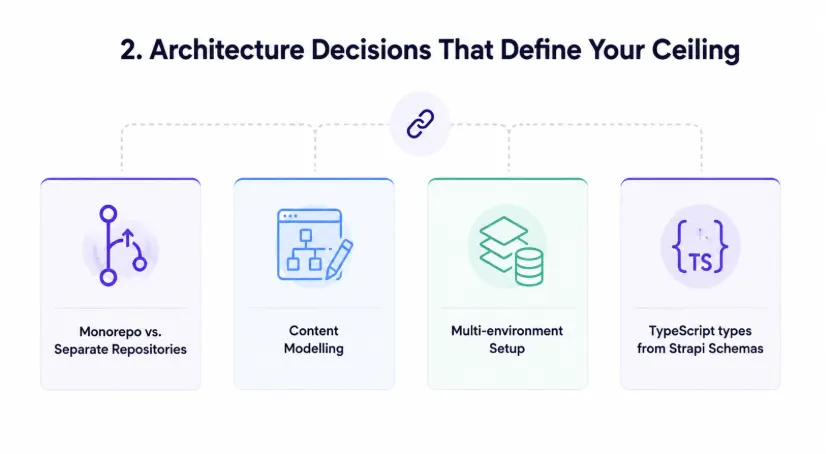
Teams new to headless architecture should understand the beginner guide to Strapi CMS architecture before defining content workflows. Before writing any code, your team needs to make a few decisions that shape everything downstream.
Monorepo vs. Separate Repositories.
For teams with fewer than 10 developers, a monorepo is easier to manage because everything stays in one place, from shared TypeScript types to CI pipelines and code changes.
For larger teams with separate ownership of frontend and backend, separate repos give cleaner release independence.
Content Modelling
Content modelling is where projects go wrong. Teams rush past it to get to the build. Six months later, they are rebuilding content types because the model does not match how editors actually work.
Before you build, map your content model to your real editorial workflow, not to a database schema.
Multi-environment setup
Every production-ready Strapi project needs at least three environments:
- Local development with SQLite
- Staging with PostgreSQL
- Production.
Each should have its own Strapi instance, its own database, and its own scoped API tokens.
TypeScript types from Strapi Schemas
Strapi v5 generates types from your content-type definitions. Use them. API contract mismatches get caught at compile time rather than runtime, and new developers can understand the data model without reading documentation.
3. Authentication and Authorization: Getting It Wrong Is Expensive
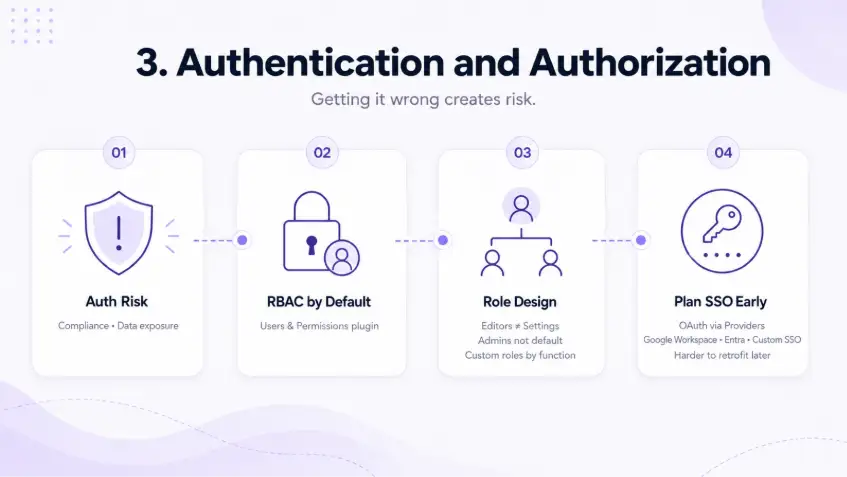
Authentication failures are not just a technical problem. They create compliance risk, data exposure, and emergency remediation that pulls your team off roadmap work.
Strapi's built-in Users and Permissions plugin gives you role-based access control out of the box. The key is mapping it to how your organisation actually works.
- Editors should not have access to settings.
- Admins should not be the default role for new users.
Custom roles that match real job functions prevent accidental data changes and privilege creep.
For companies with an existing identity provider (Google Workspace, Microsoft Entra, or a custom SSO), Strapi supports OAuth through its Providers plugin. Plan this early. Retrofitting SSO into an existing auth layer is significantly harder than building it in from the start.
4. Data Fetching and ISR: Performance Content Teams Can Control
Incremental Static Regeneration (ISR) is one of the most practical features of Next.js for content-heavy sites. Pre-built pages serve instantly. When an editor publishes, only the affected pages are refreshed, without a full rebuild or a new deployment.
From an editor's perspective: publish content, see it live within seconds, no developer required.
Next.js 15 uses Server Components by default. For most Strapi integrations, this is the right starting point. Data fetching happens on the server, API tokens stay off the client, and pages render with full content before reaching the user.
Time-based revalidation works well for content that changes infrequently:
js
const res = await fetch('https://your-strapi.com/api/articles', {
  next: { revalidate: 3600 }
});
On-demand revalidation is better when editors expect changes to appear immediately. A Strapi webhook fires on publish, your Next.js Route Handler receives it, and revalidateTag clears the cache for the affected pages.
On REST vs. GraphQL: use REST for most projects. It is simpler to cache, simpler to debug, and works naturally with Next.js's fetch-based caching.
Reach for GraphQL only when your content model has deep, complex relations that REST queries cannot handle cleanly.
5. Media and Asset Management at Scale
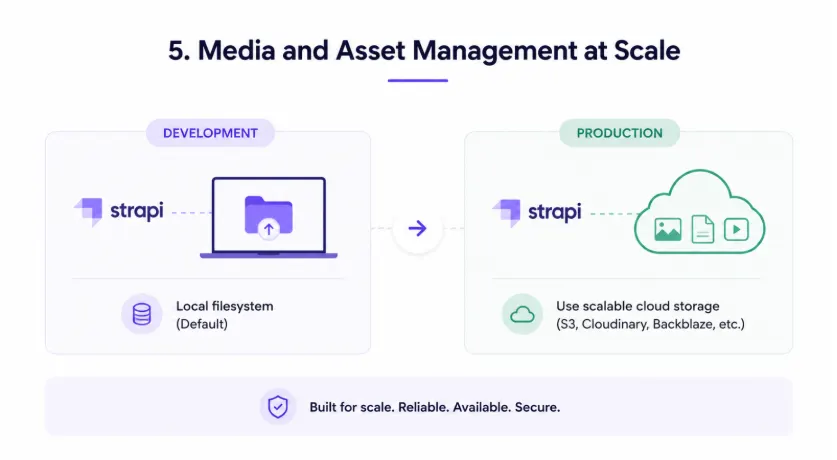
Strapi stores uploaded files on the local filesystem by default. This works in development. It does not work in production.
Most cloud hosting platforms use ephemeral file systems. Files uploaded today may not exist after the next deploy. Local storage also does not scale across multiple Strapi instances, and serving media from your application server adds unnecessary load.
Use a Cloud Storage Provider in Production
Strapi has official upload plugins for Cloudinary, AWS S3, and Cloudflare R2. Cloudinary is the easiest option for teams that want built-in image transformation. R2 is worth considering for teams that want to avoid egress fees.
Once your media is on a cloud provider, use next/image for every image that comes from Strapi. It handles format conversion (WebP, AVIF), responsive sizing, lazy loading, and blur placeholders automatically. The impact on Core Web Vitals scores, specifically LCP and CLS, is measurable and directly affects SEO.
6. Webhooks, Real-Time Updates, and the Editorial Workflow
Without webhooks, the publish-to-live loop looks like this: editor publishes, developer triggers a rebuild, build runs for 10 to 30 minutes, content goes live. That is not acceptable for a team publishing frequently.
Webhooks close the gap. When Strapi fires a webhook on publish, your Next.js app receives it and revalidates only the pages that changed. Editors see their content live in seconds.
Configure webhooks in Strapi under Settings > Webhooks. Define the URL of your Next.js Route Handler, the events to listen for (entry.publish, entry.unpublish), and a shared secret in the headers for verification.
Your Route Handler should verify the secret before processing, identify which content type changed, and call revalidatePath or revalidateTag accordingly. For higher-security environments, use HMAC-SHA256 signatures instead of a plain shared secret.
7. Enterprise Readiness: Governance, i18n, and Scale
As your Strapi + Next.js setup grows, you need to plan beyond basic publishing. Governance, localisation, performance, and SEO should be considered early, not after the platform becomes difficult to manage.
Content Governance
Content governance becomes important when more than a handful of people are creating and managing content.
Strapi v5 supports draft and publish workflows natively. For larger teams, custom roles can help create a clear editorial approval process:
Writer submits → Editor approves → Admin publishes
This keeps publishing controlled and reduces the risk of accidental content changes.
Internationalisation
Internationalisation is often underplanned. Companies entering multiple markets later may realise their content model does not support localisation properly.
Even if you launch in one language, it is better to configure locales in both Strapi and Next.js from day one. This makes future expansion easier and avoids unnecessary rebuilding later.
Performance at Scale
Businesses building scalable headless CMS architecture should optimize caching, database performance, and API response handling early. Performance at scale needs attention across every layer, including:
- Query complexity in Strapi
- Populate depth
- Cache strategy by content type in Next.js
- CDN edge caching for static and ISR pages
- Database indexing
- Connection pooling in production
Strapi’s default configuration is not tuned for high-traffic workloads, so load testing before launch is important.
8. Production, Support, and What Ongoing Partnership Looks Like
Strapi Production Setup
For Strapi in production, use PostgreSQL and a hosting platform that fits your team's operational maturity.
Recommended hosting options:
- Railway and Render: Fast to set up and well-suited for smaller teams.
- Strapi Cloud: A fully managed option.
- AWS, GCP, and Azure: Suitable for teams with existing cloud infrastructure.
Next.js Hosting
For Next.js, Vercel is the natural choice. Its integration with ISR, Edge Middleware, and Draft Mode is tight.
Self-hosted Next.js on a Node.js server is also viable for teams that need more control.
Pre-Launch Security Review
Before going live, complete a security review that includes:
- API token rotation policy
- Rate limiting on Strapi endpoints
- HTTP security headers
- CORS locked to production domains
- Dependency audit
This is not a one-time task. Make it part of your ongoing maintenance process.
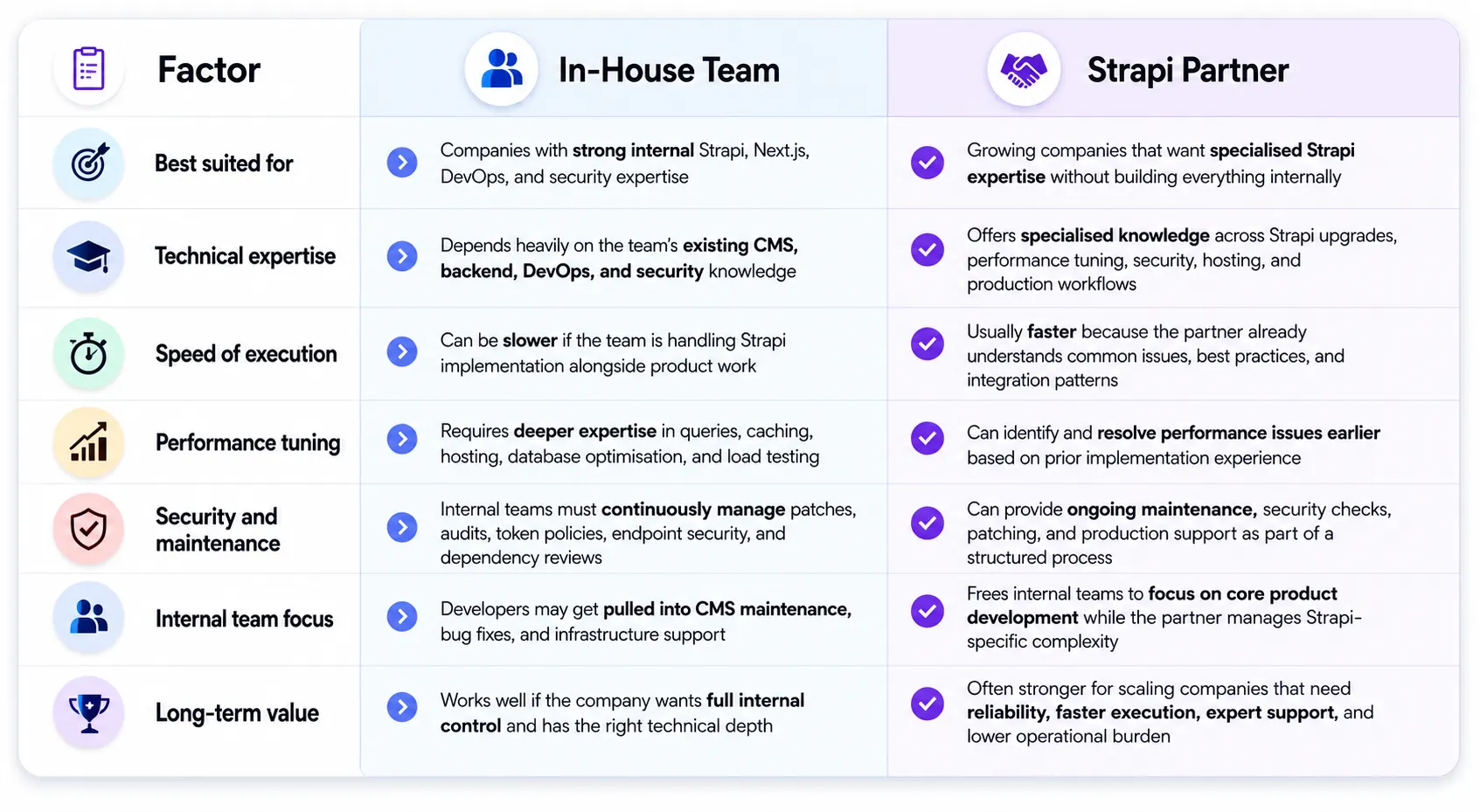
In-House Team vs. Strapi Partner
Many growing businesses prefer to hire experienced Strapi developers instead of building internal CMS expertise from scratch.
Project Timeline Factors
For companies planning a new project, the factors that most influence timeline are:
- Number of content types
- Auth complexity
- Number of locales
- Third-party integrations
A typical engagement for a scaling company with a moderate content model runs between 8 and 16 weeks.
Work With OpenSpace Services
At OpenSpace Services, we design, build, and maintain Strapi + Next.js platforms for scaling companies. We know where most projects go wrong, and how to build the right architecture from the start.
If you are scoping a new project, reviewing an existing architecture, or evaluating whether Strapi is the right fit, we would be glad to talk. We help businesses build, optimise, migrate, and manage Strapi implementations for high-traffic websites, complex content models, enterprise workflows, and large databases. From performance audits and API optimisation to caching, cloud deployment, DevOps, security, and frontend integration, our team ensures your CMS is fast, stable, and ready for growth.
Read this Case Study to learn more about how we approach our projects.
Book a consultation with the OpenSpace Services team.