

Quick answer: Strapi has built-in tools for moving data, so a migration is mostly planning. Use strapi transfer to move data between two running Strapi projects. Use strapi export and strapi import to switch database types, such as SQLite to PostgreSQL. Take a full backup first, follow a short checklist, then test before you switch over.
Most Strapi projects start on SQLite. It's quick to set up and perfect while you build. Then the project grows, a staging server appears, or hosting changes, and the data needs to move.
A Strapi DB migration sounds risky, but the steps are repeatable. Here's how to migrate Strapi database content safely, from selecting the right tool to validating the result. If the move also involves a production upgrade or architectural changes, our Strapi database migration servicescan help you plan the work around your existing setup.
Which Strapi Migration Tool Should You Use?
Strapi gives you three main ways to move data. Each one suits a different kind of Strapi data migration, so pick by what you're moving and where it's going.
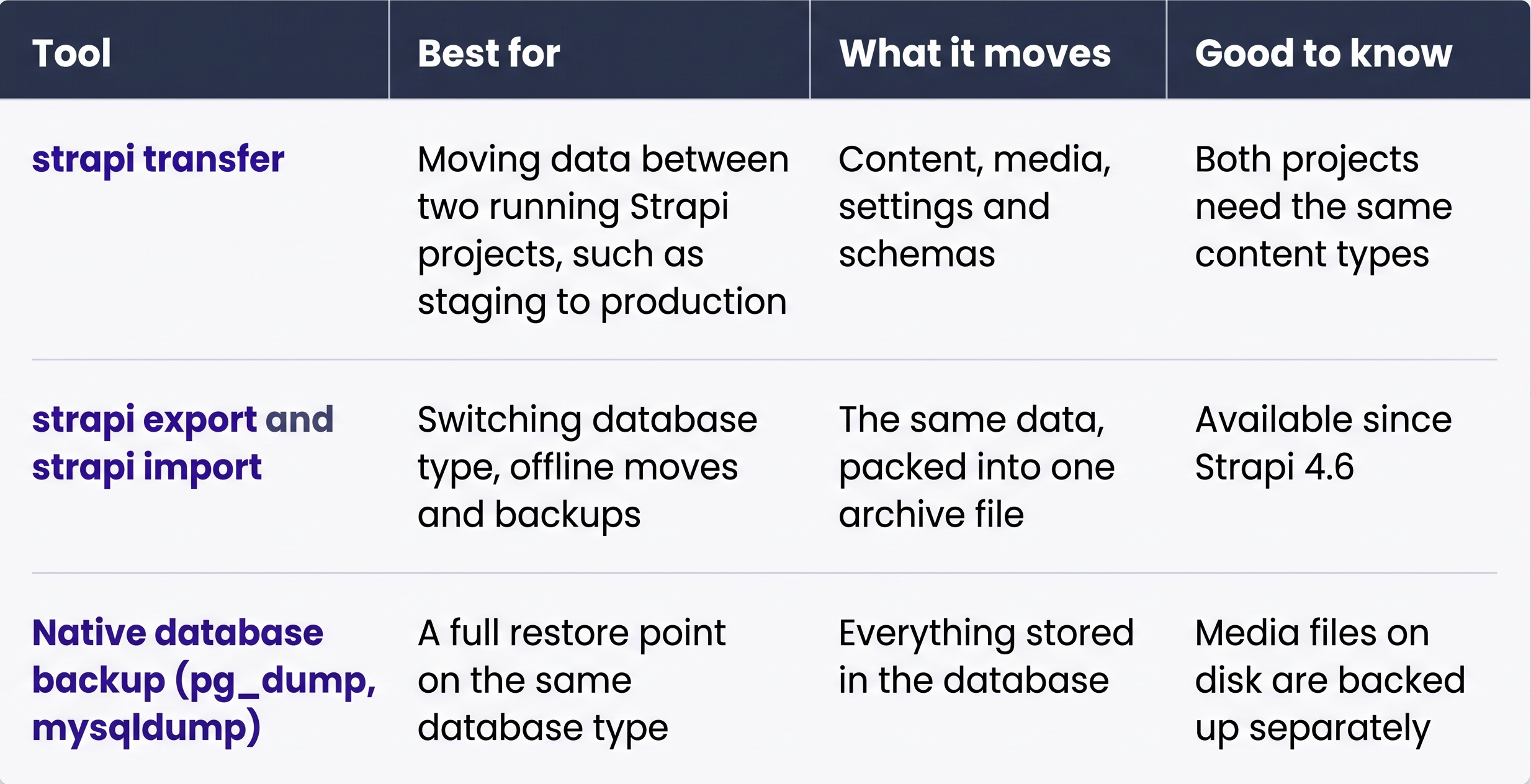
Source: Strapi Docs, Data transfer and Data export
When does a Strapi Database Migration Make Sense?
A migration makes sense when your project outgrows its current setup. The most common reasons are moving to a production database, syncing environments, changing hosts, or upgrading from Strapi v4.
- Growing beyond SQLite:Your project needs a production database that handles more traffic
- Syncing environments:Staging needs fresh content, or approved content needs to reach production
- Changing hosting:You're moving to a new server or cloud provider
- Upgrading from v4: Strapi ended v4 support in October 2025, and security fixes stopped at the end of April 2026
If you're still on v4, put the upgrade first. Everything else is easier on Strapi 5.If the database move is part of a major-version upgrade, review theStrapi v4 to v5 migration guide before choosing your migration sequence. The code changes, API compatibility, and database checks should be planned together.
Which Databases Work Best with Strapi?
Strapi 5 works with PostgreSQL, MySQL, MariaDB and SQLite. We recommend PostgreSQL for most production projects and SQLite for local development. Check your target version before you start.
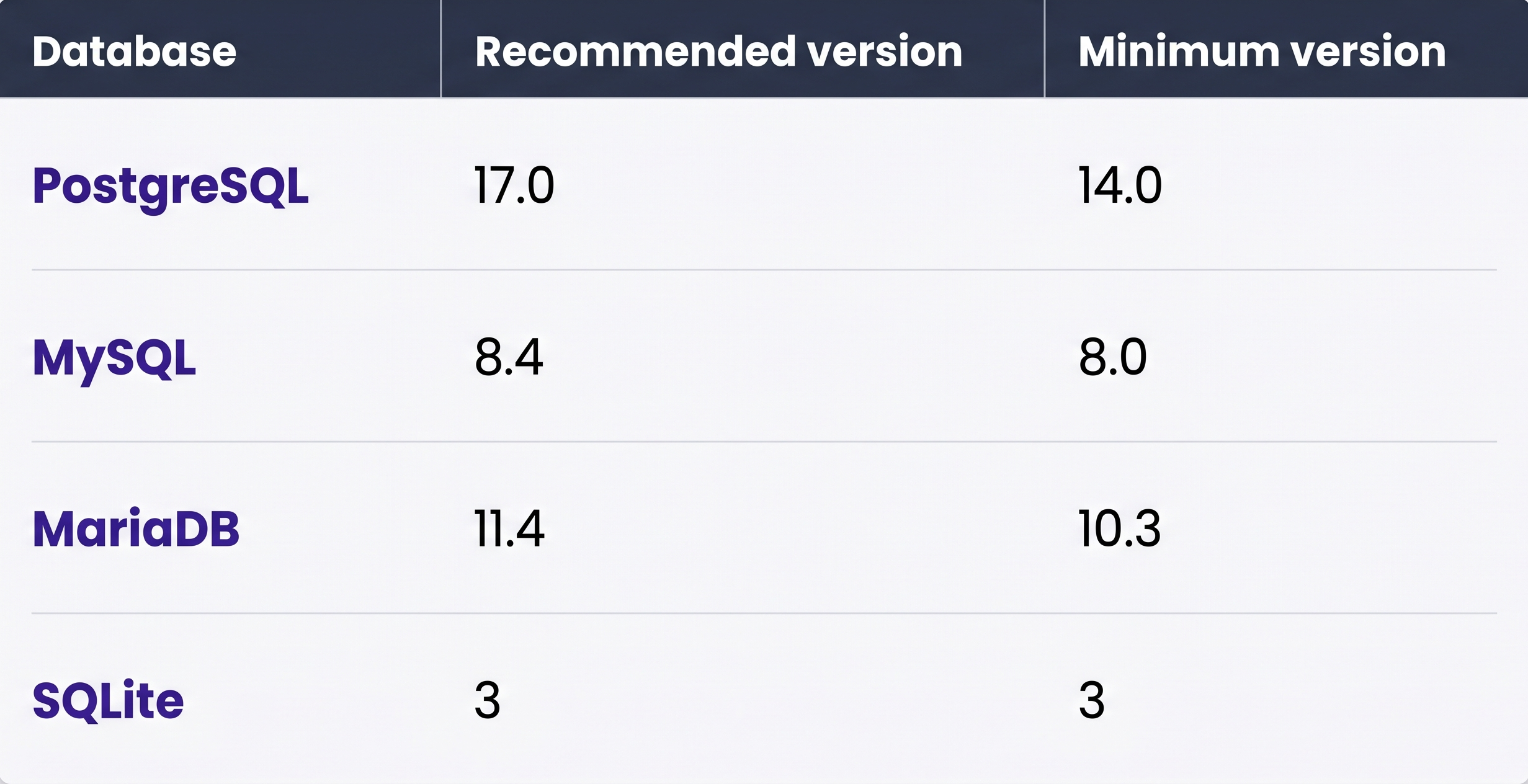
Source: Strapi Docs, Database configuration
Database choice should also reflect expected content volume, query patterns, hosting constraints, and operational capacity. For larger projects, review our guide to Strapi performance at scale before finalizing the production architecture.
What Should a Strapi Migration Plan Include?
A good plan covers your data, your media, your people and your settings. Write it down before you run a single command. It turns the move into a checklist instead of a guessing game.
- Two backups: A native database backup and a Strapi export
- Content and media together: Move images with their media library records, so nothing ends up missing
- Access: Strapi's tools move content, media and settings, while admin accounts and API tokens are created fresh on the new setup. List who needs access and which apps use tokens.
- Secrets: Copy your .env values, including app keys and salts
- A content freeze: Pause content type changes until the move is finished
- A rollback point: Agreewhat "go back" looks like before you start
How do You Migrate a Strapi Database, Step-by-Step?
The steps depend on where your data is going. Moving to a new database type uses export and import. Moving between two live projects uses transfer. Both follow the same pattern: back up, prepare the destination, move, then check.
How do You Move from SQLite to PostgreSQL?
- Export your data from the SQLite project. Use an encryption key for real data.
npm run strapi export -- -f strapi-backup- Create a PostgreSQL database and user. Give the user schema permissions:
GRANT ALL ON SCHEMA public TO my_strapi_user;- Install the PostgreSQL driver with npm install pg.
- Update .env with DATABASE_CLIENT=postgres and your connection details.
- Build and start Strapi once, so it creates its tables.
- Import your data:
npm run strapi import -- -f strapi-backup.tar.gz.enc- Create your admin users and API tokens, then update any front-end environment variables.
Moving to MySQL works the same way. Install mysql2 instead of pg, and set DATABASE_CLIENT=mysql.
How do You Move Data Between Staging and Production?
For a Strapi migrate database job between two live servers, strapi transfer is the quickest route. It streams data directly, with no archive file in between.
- Deploy the same code to both projects, so their content types match.
- Start the destination with npm run start.
- Create a transfer token in the destination's admin panel.
- Run the transfer from the source project:
npm run strapi transfer -- --tohttps://your-site.com/admin
- Confirm the prompt. The data you transfer replaces the matching data on the destination.
To refresh content but keep the destination's settings, add --only content.
Can You Move only Some Content Types?
Yes. Since Strapi 5.51.0, you can transfer or export specific content types and leave the rest untouched. It's useful for moving a new section of the site without touching anything else.
npm run strapi transfer -- --tohttps://your-site.com/admin--only-content-types api::article.article
What Changes When You Upgrade from Strapi v4?
A Strapi v4 database migration is mostly handled by Strapi itself. The upgrade tool updates your code, and built-in scripts update the database on first startup.
- Back up the database and run a Strapi export first
- Upgrade to the latest v4 release first, then run the major upgrade on a copy of production
- Keep your backup until the new version has run cleanly for a while
Strapi doesn't offer an automated downgrade from 5 to 4, so your backup is your rollback point. Our Strapi v4 to v5 upgrade guide covers the code changes in detail.
What Did a Real Strapi v4 to v5 Upgrade Look Like?
We recently upgraded a client's production Strapi project from v4.26.0 to v5.33.0, keeping its MySQL database in place. The content stayed where it was. Most of the work was in the code around it.
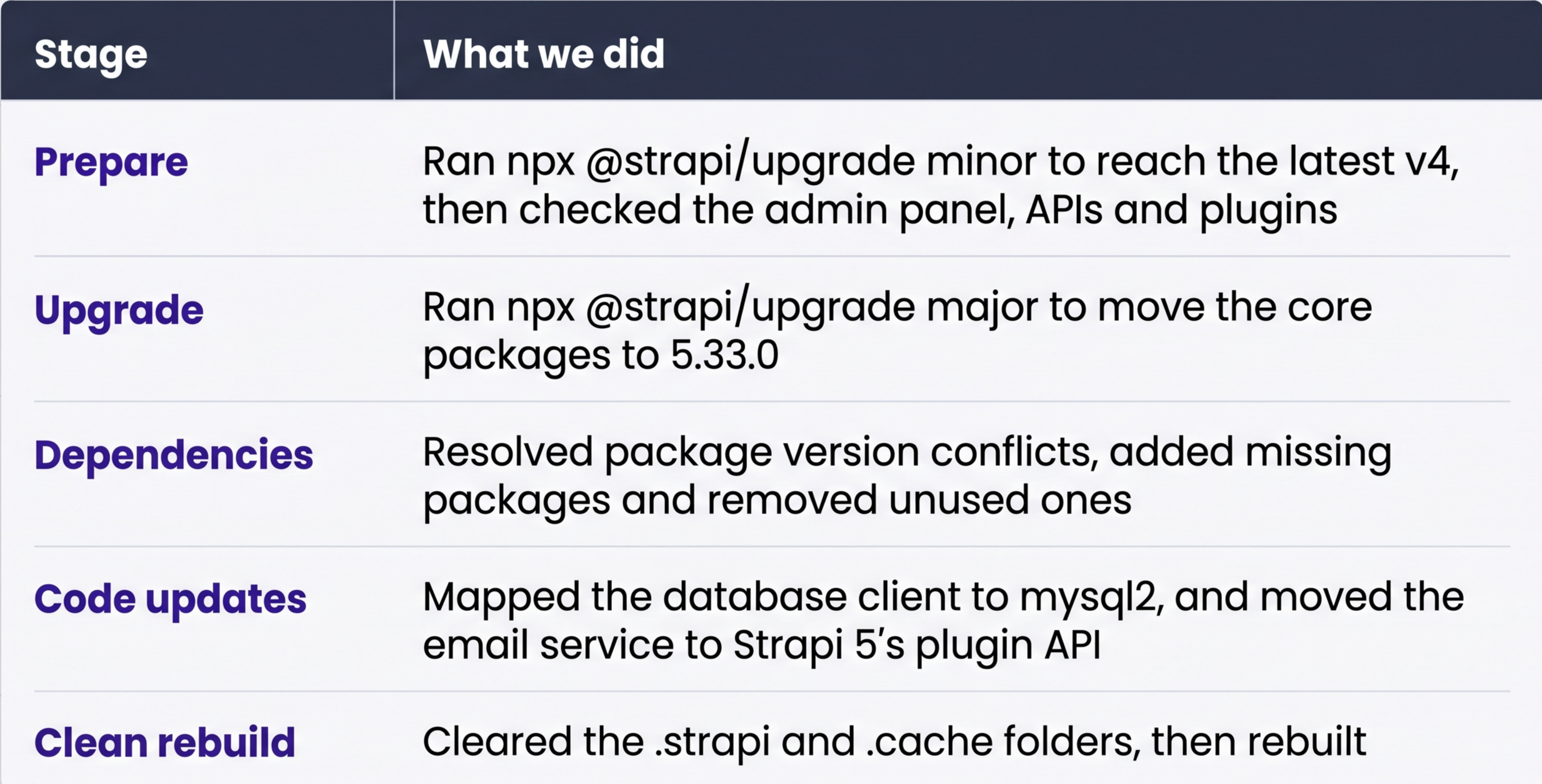
We also made one small change that keeps startup safe. The site's enquiry form sends an email after each new lead. We set that step to log a warning if the email fails, so the server never depends on an outside service to start.
The result: The server starts cleanly on Strapi 5, and we verified the admin panel and APIs before sign-off. For organisations planning a similar upgrade, experienced Strapi CMS developers can help review custom plugins, database settings, API compatibility, and deployment requirements before the migration reaches production.
How do You Confirm the Migration Worked?
Compare the new setup against the old one before you switch traffic over. Check the data, the people and the front end. Keep the old database untouched until every check passes.
- Record counts match for every content type
- Relations still connect, such as articles to their authors
- Images load on the front end and in the media library
- Every editor can log in
- Each app using an API token gets a valid response
- Key pages render correctly on the live site
When is it Worth Bringing in a Strapi Partner?
Most small projects can run these steps in-house. A partner makes sense when the stakes or the scale go up, and you'd rather spend your team's time on the product.
- Large content and media libraries that need a tested, timed plan
- Custom plugins or heavy backend customisation
- Moves that need near-zero downtime
- A v4 project that needs both an upgrade and a database move
An experienced Strapi developer has usually run these moves before and knows where to check first. Our Strapi CMS development team helps in-house teams plan database migrations, upgrade existing Strapi projects, and validate production readiness. Agencies that need delivery support under their own brand can also explore our white-label Strapi development services.
What Should You do First?
Take a full backup today, even if your move is months away. Then do a test run on a copy of your project. You'll know exactly how long it takes and what to check before you ever touch production.
When you're ready to migrate Strapi database records for real, talk to our Strapi team.