

Did you know, there are now 5.78 billion unique mobile users worldwide and they have precisely zero patience for apps that stutter?
At the same time, Google Play Vitals shows that apps with an ANR rate above 0.47% or a crash rate above 1.09% risk silent ranking drops on the Play Store often before users even leave negative reviews.
For many mobile teams, the pattern is familiar: a new feature goes live, engagement spikes briefly, then performance issues begin to surface.
Load times increase, crashes appear in production, and battery drain complaints start affecting ratings and retention.
In most cases, the issue is not a single bug; it is the lack of a clear performance strategy.
Mobile app developers who want to move from reactive firefighting to proactive mobile app performance optimization, keep reading.
We'll cover root causes, platform-specific tooling, network strategies, and an original framework from the OSSPL engineering team.
What is Mobile App Performance Optimization?
Mobile app performance optimization is the process of improving app speed, stability, responsiveness, battery efficiency, and scalability to deliver a better user experience across devices and network conditions.
TL; DR - What you’ll walk away knowing
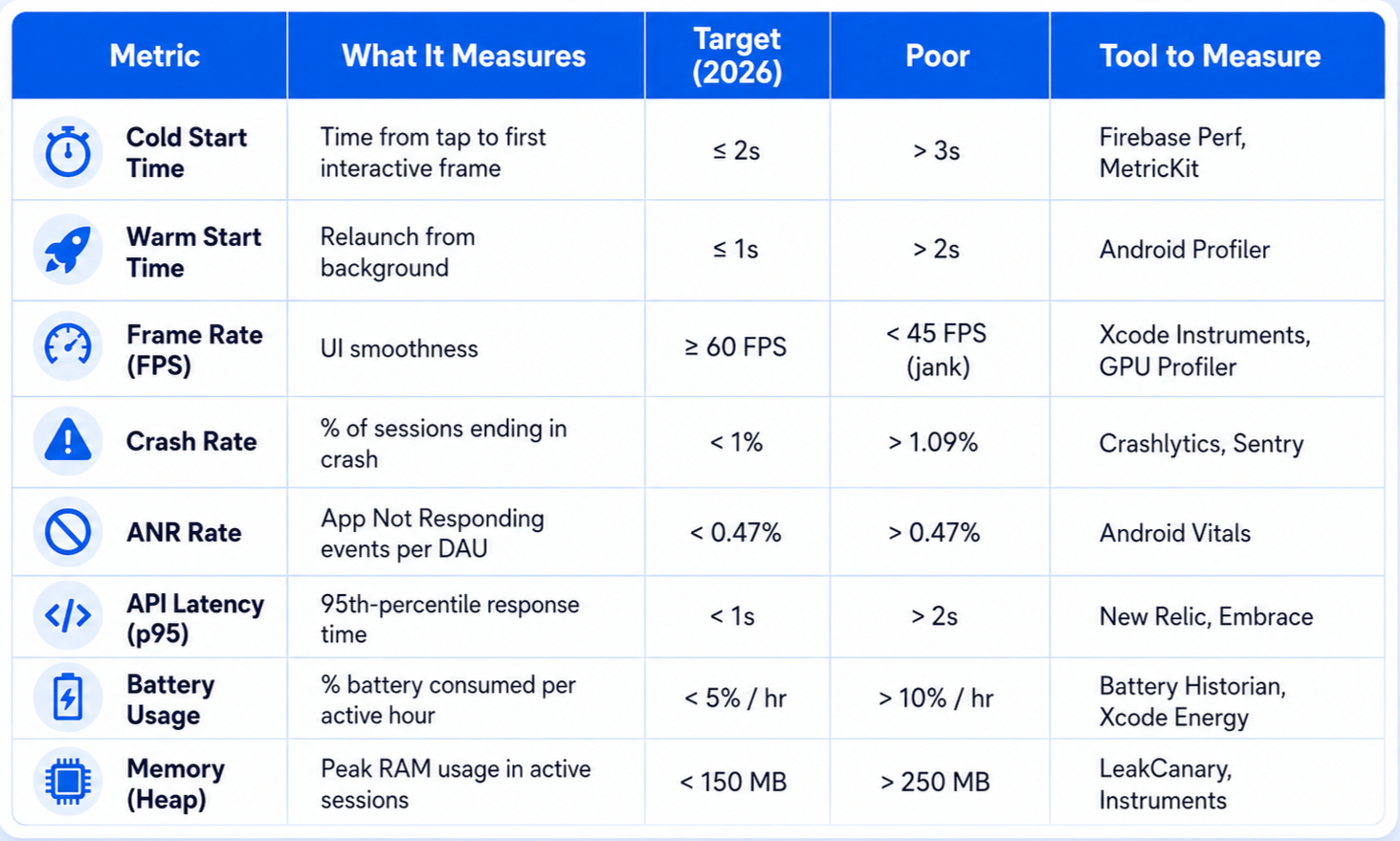
- The 2026 benchmarks: Cold start under 2s, crash rate below 1%, FPS ≥ 60, battery under 5% per hour.
- Fix app crashes by tracing them to memory pressure first.
- App load time optimization starts before your first line of code. Lazy initialization and deferred SDK loading can cut cold start by 40%.
- App battery optimization means eliminating excessive wake locks and background polling, not just reducing CPU usage.
- Platform tools matter: Use Xcode Instruments (iOS) and Android Studio Profiler (Android) as your first line of diagnosis.
- Network is often the real bottleneck: API response caching and request batching can reduce perceived load time by 50%+.
- OpenSpace Services' PACE framework gives developers a 4-step repeatable process for continuous performance improvement.
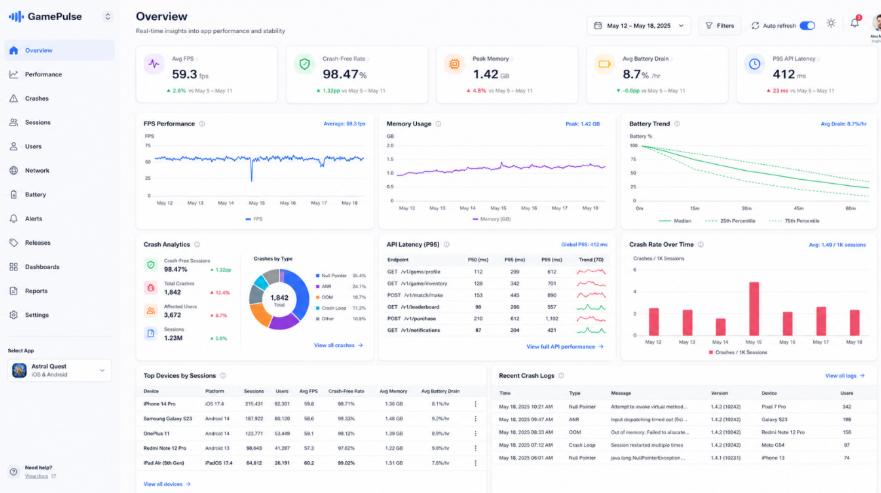
In 2026, a high-performing app launches in under 2 seconds, maintains 60 FPS rendering, keeps crash-free sessions above 99.8%, minimizes background battery consumption, and handles network instability gracefully.
Performance standards are stricter because user patience is lower than ever. Businesses building scalable applications should carefully evaluate mobile app development partners with performance optimization expertise before starting development. Mobile users expect desktop-level responsiveness even on mid-range devices.
According to Google Android Developers and other studies:
- ANRs above 0.47% negatively impact Play Store visibility.
- Apps with frequent crashes experience significantly higher uninstall rates
- Battery-intensive apps receive lower app store ratings over time.
App Performance Metrics Table: What Developers Should Track
Root Causes by Category: Crash Rate, Slow Load, Battery Drain, Memory Leaks
Most performance issues originate from inefficient memory management, excessive background processing, unoptimized APIs, rendering bottlenecks, and lack of continuous profiling.
Let’s break down the most common root causes developers face.
Why Do Apps Crash Frequently?
- Unhandled null pointer / force unwraps
- Memory pressure triggering OS kill
- Third-party SDK conflicts on specific OS versions
- Concurrent writes to shared state (race conditions)
- Network errors not caught in async callbacks
Why Are App Load Times Slow?
- Synchronous work on the main thread at launch
- All SDKs initialized at cold start
- Uncompressed image assets loaded eagerly
- Blocking database queries before first paint
- Deep-link routing logic running before U
Why Does Battery Drain Happen So Fast?
- Excessive partial wake locks kept open
- Location / GPS polling at high frequency
- Unthrottled background network polling
- Heavy animation running off-screen
- AI/ML inference without energy budgets
Why Are Memory Leaks Still Common?
- Activity/Fragment context held in static fields
- Anonymous inner classes capturing outer references
- Bitmap objects not recycled in image pipelines
- Event listeners not unregistered on destroy
- Caches without size or time eviction policies
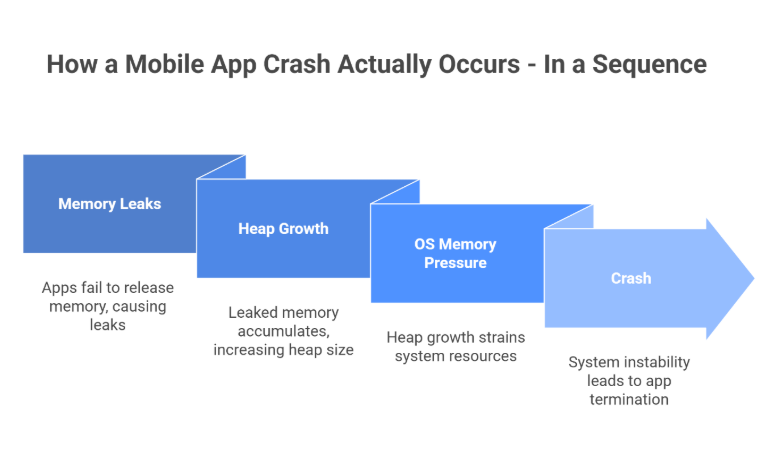
The cascade to understand: Memory leaks → heap growth → OS memory pressure → crash. This means a crash report is often the last symptom of a leak that started much earlier. Teams investing in mobile app development services that prevent app crashes generally reduce long-term maintenance costs and improve app stability after launch. Trace backwards.
At OSSPL we strive to build apps that don’t fail after launch. However, if your app starts slowing down, or faces issues post-launch, we stay with you to continuously optimize performance, improve stability, and prepare the app for long-term growth.
How Can Developers Optimize Performance Differently on iOS vs Android?
Android optimization focuses heavily on device fragmentation and memory profiling, while iOS optimization prioritizes rendering efficiency and energy impact monitoring. So, platform-specific profiling is non-negotiable.
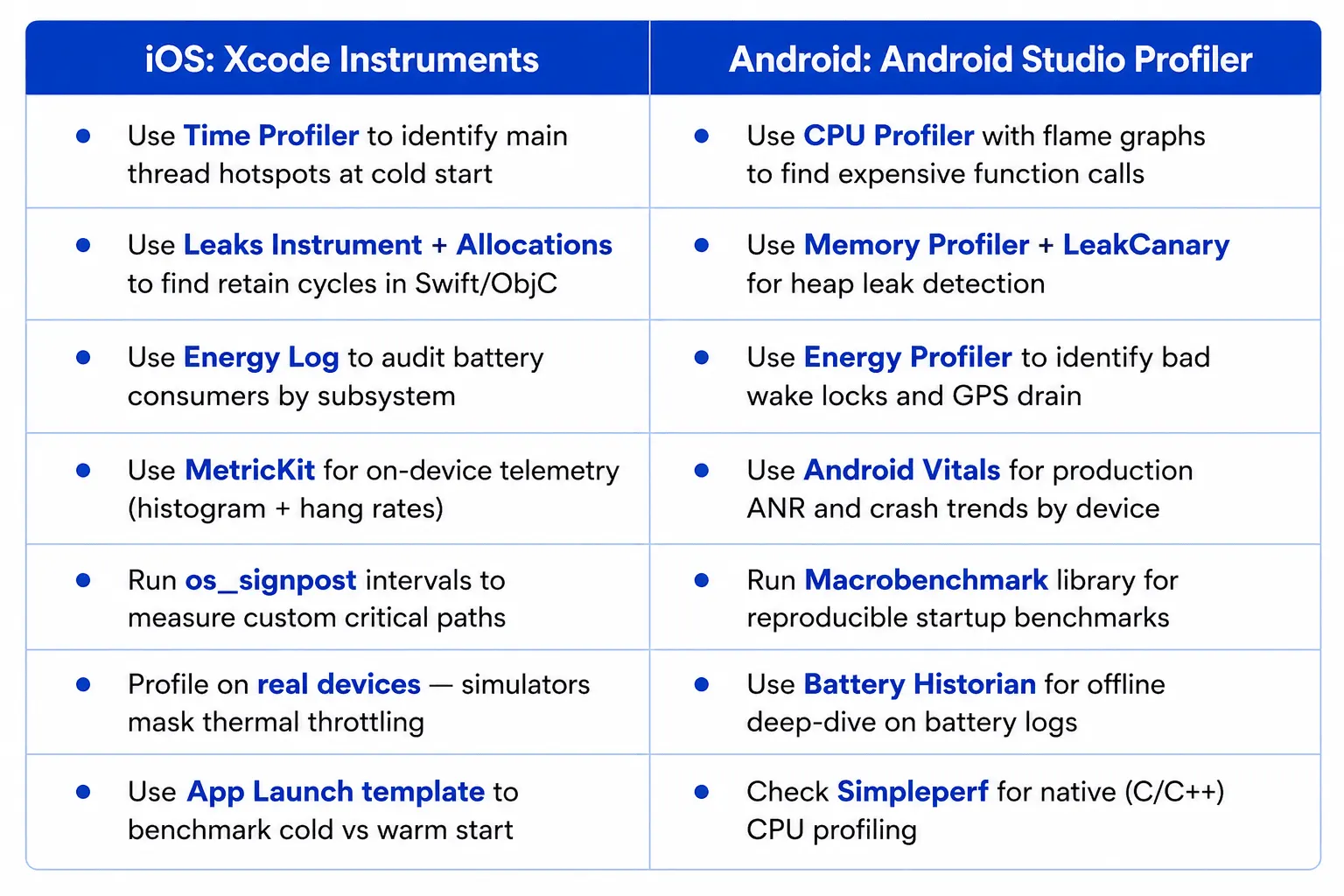
At OpenSpace Services, we’ve developed a structured methodology for mobile app performance optimization process -
The PACE Framework by OpenSpace Services
This is a repeatable 4-phase model our teams apply across different types of mobile app projects and industries.
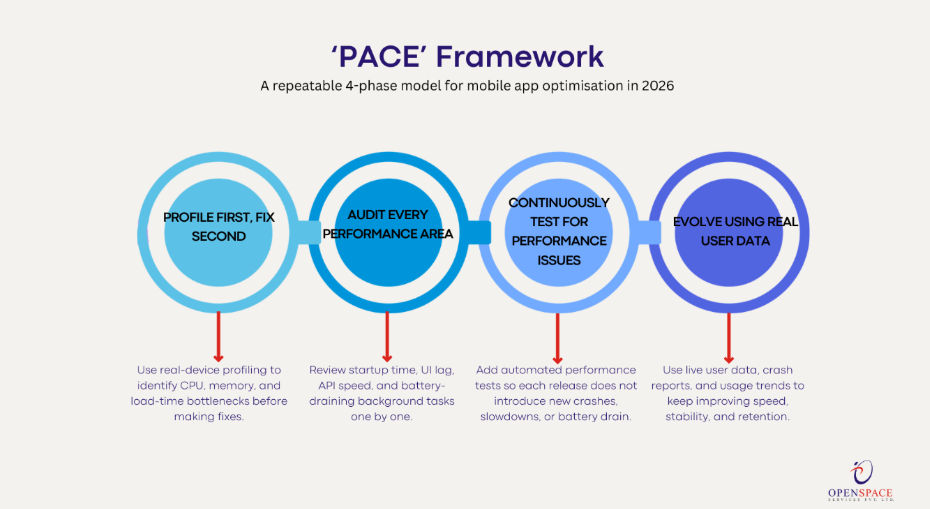
P— Profile First, Fix Second
First, identify what is slowing the app down using real-device testing and profiling tools. Instead of guessing, track CPU usage, memory usage, and load times to find the actual issue.
A — Audit Every Performance Area
Review each performance issue separately, including:
- Slow app startup
- UI lag and frame drops
- Slow APIs and network calls
- Background tasks draining battery
This makes debugging faster and more organized.
C — Continuously Test for Performance Issues
Add automated performance testing into the development pipeline so new code updates do not accidentally increase crashes, load times, or battery usage.
E — Evolve Using Real User Data
Monitor how real users experience the app after launch. Use live performance data, crash reports, and usage trends to continuously improve app speed, stability, and user retention.
How Can Developers Optimize Network Performance to Improve App Load Time?
Network latency is frequently the single biggest bottleneck in mobile load time. This becomes even more critical in AI-driven mobile application development, where real-time inference and API-heavy workflows can significantly impact app responsiveness.
Combining API response caching, lazy loading of non-critical resources, request batching, and payload compression can reduce perceived load time without changing a single line of UI code.
1. API Response Caching
Store frequently used API responses locally so the app does not fetch the same data repeatedly.
Common approaches:
- Use ETag and Cache-Control headers
- Store data in Room, SQLite, or CoreData
- Use stale-while-revalidate to show cached data instantly while refreshing in the background
This reduces launch delays and improves offline experience.
2. Lazy Loading
Load only the content users immediately need.
Examples:
- Load images only when they appear on screen
- Delay analytics or secondary modules during startup
- Use pagination or infinite scrolling instead of loading large datasets at once
This reduces initial load time and memory usage.
3. Request Batching
Instead of sending many small API requests separately, combine them into fewer network calls.
Benefits:
- Reduces network overhead
- Improves response speed on slower mobile connections
- Lowers battery and data consumption
This is especially useful for apps with multiple dashboard widgets or real-time feeds.
4. Payload Compression
Reduce the size of data transferred between server and app.
Best practices:
- Enable Gzip or Brotli compression
- Use WebP or AVIF images instead of large JPEG/PNG files
- Minify JSON responses where possible
Smaller payloads mean faster downloads and better app performance.
5. Offline-First Architecture
Design the app to work even with poor or unstable internet connections.
How:
- Show cached content first
- Sync updates in the background
- Queue failed requests and retry later
This improves user experience in low-network environments.
6. GraphQL or Selective Data Fetching
Many apps download more data than the screen actually needs.
To avoid over-fetching:
- Use GraphQL to request only required fields
- Use sparse field selection in REST APIs
This reduces payload size, parsing time, and app load delays.
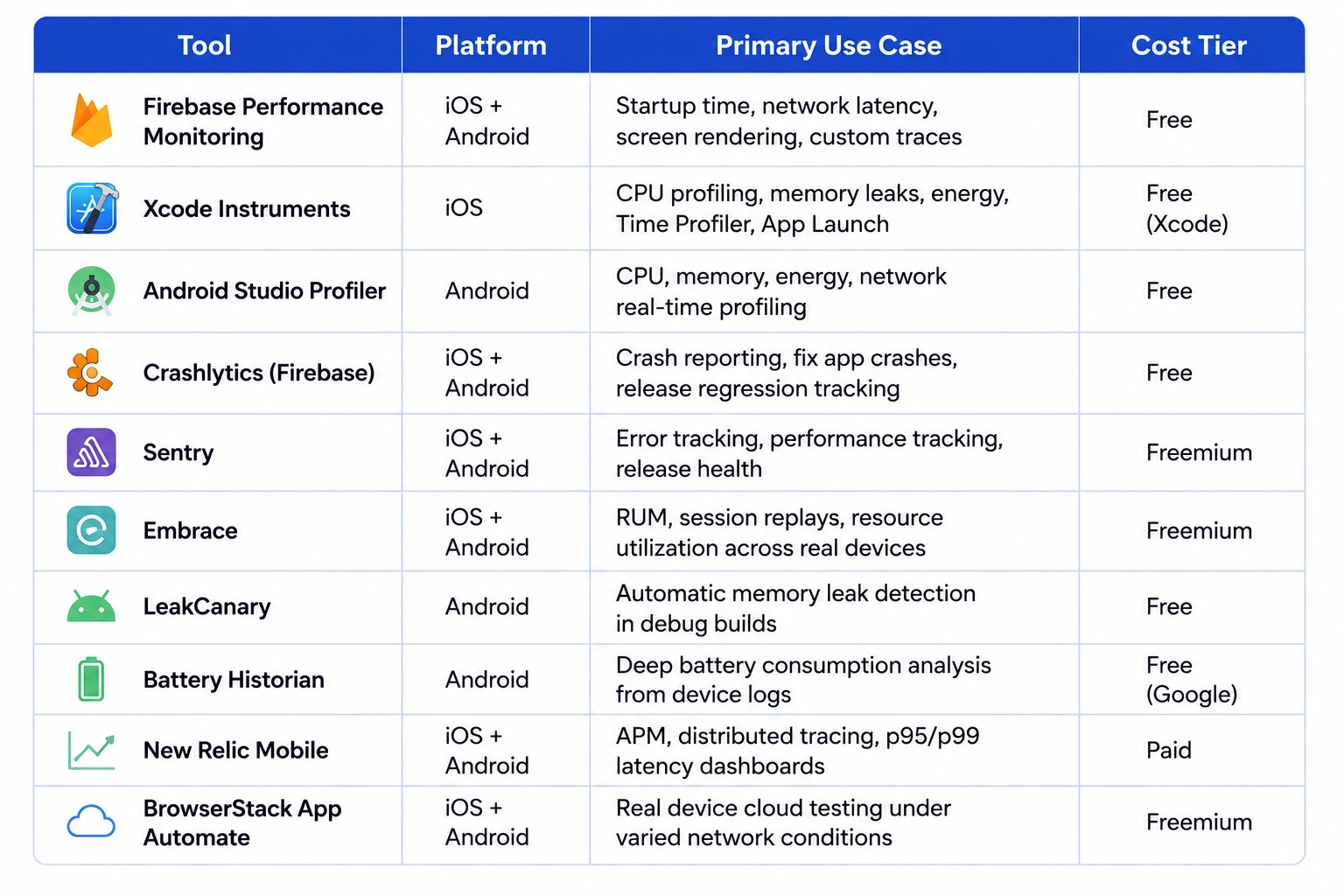
Which Tools Should Developers Use for Mobile Performance Monitoring in 2026?
Final Thoughts
Fast, stable apps are no longer a bonus feature; they’re the baseline. Apps with performance issues like crashes, slow load times, memory leaks, and battery drain can quietly impact user trust long before teams notice a drop in ratings.
The teams building the best mobile experiences today are the ones treating performance as a continuous process, not a last-minute fix. Building scalable products starts with following a structured mobile app development process that prioritizes architecture, performance, and long-term stability from the beginning.
At OpenSpace Services Pvt Ltd (OSSPL), we’re a full-stack technology partner helping startups and enterprises build, audit, and scale mobile apps that perform under real-world conditions.
Based in Mumbai with a global delivery footprint, our teams have delivered 200+ mobile and software projects across health-tech, logistics, fintech, and e-commerce.
Whether you need a performance audit, a mobile app built from scratch, or engineering support for an existing product; let’s talk.