


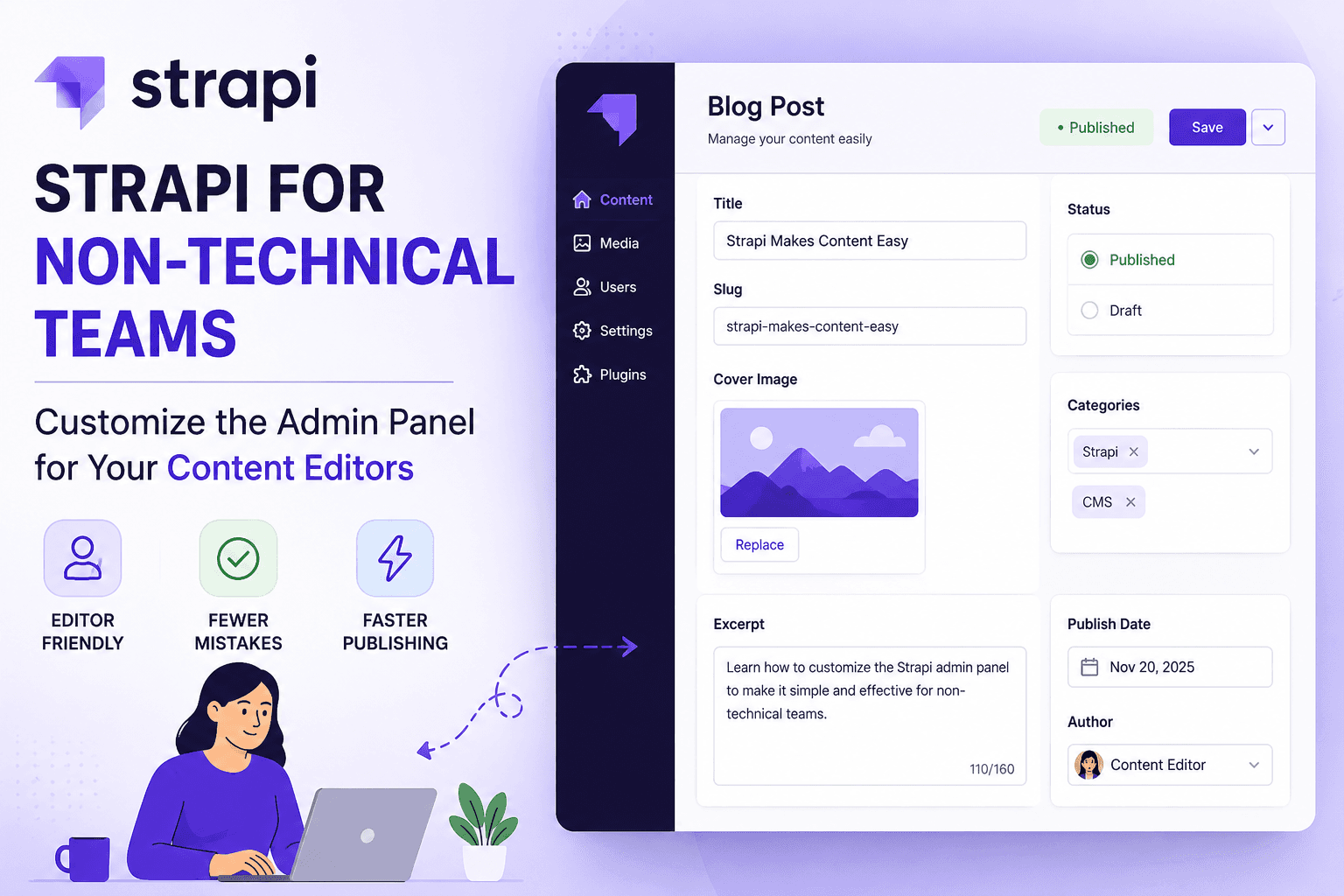
A content editor opens Strapi to publish a blog update. Instead of writing, they spend 20 minutes figuring out which field to fill, whether the entry is live, and why they suddenly lost publishing access.
That friction is more common than most technical teams realize.
Even though Strapi is one of the most flexible headless CMS platforms available today, default admin experiences often overwhelm non-technical teams. Gartner Peer Insights reviewers repeatedly mention that Strapi is powerful but can still feel “technical” for marketers and editors. This challenge becomes more visible as businesses scale their headless content management systems across multiple teams and publishing workflows.
The good news: the Strapi admin panel customization is super easy.
With the right setup, developers can turn Strapi into an editor-friendly publishing workspace that reduces dependency on engineering teams, minimizes publishing mistakes, and speeds up content operations.
How do you Make Strapi Easier for Non-Technical Editors?
To make Strapi easier for non-technical editors, simplify field layouts, use role-based permissions, add clear field descriptions, implement structured publishing workflows, and customize the admin interface around real editorial tasks instead of developer workflows.
TL; DR
- Default Strapi interfaces can confuse non-technical editors.
- Customizing the admin panel improves adoption, publishing speed, and content accuracy.
- The biggest usability wins come from: simplifying fields, improving navigation, role-based permissions, better workflows, and editor-focused dashboards.
- Teams that optimize CMS usability reduce developer interruptions and publishing bottlenecks.
- Strapi supports extensive admin customization through plugins, permissions, layouts, and UI extensions.
Why Does the Default Strapi Admin Panel Frustrate Content Teams?
The default Strapi admin panel is developer-centric by design. It exposes all content-type fields, relations, plugin settings, API configurations, and system internals at once. For a content editor whose job is to write a headline, add an image, and hit publish; this is overwhelming and error-prone.
According to a Gartner peer review about Strapi, one user says –
“We migrated to Strapi. Overall it has been OK but there are some difficulties for non-technical people. They keep accidentally toggling draft state or touching fields they don’t understand. We need to hide at least half the panel from them.”
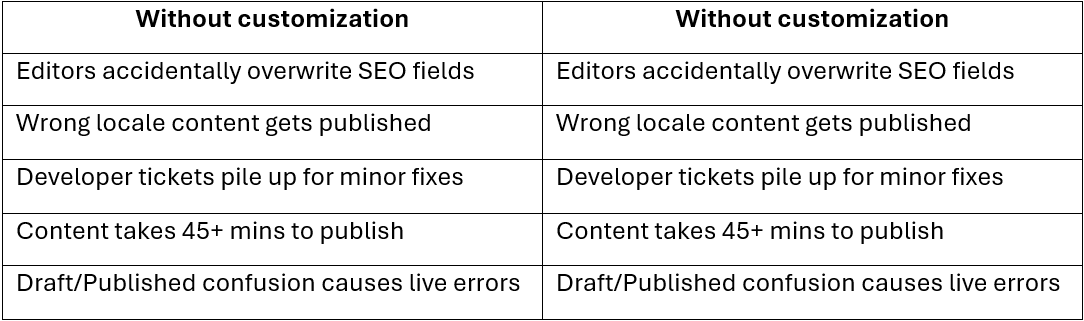
The real cost of an uncustomized admin panel
How Do You Simplify the Strapi Admin UI for Content Editors?
Essentially, you need to simplify the Strapi admin UI by reorganizing field layout in your content-type builder (putting critical fields first), hiding developer-only fields from editor roles, using clear field labels and placeholder descriptions, and leveraging Strapi 5’s Conditional Fields to show inputs only when relevant.
The goal: every editor should be able to complete their task in one linear scroll. Achieving this level of usability often requires teams to hire experienced Strapi developers who understand both content operations and scalable CMS architecture.
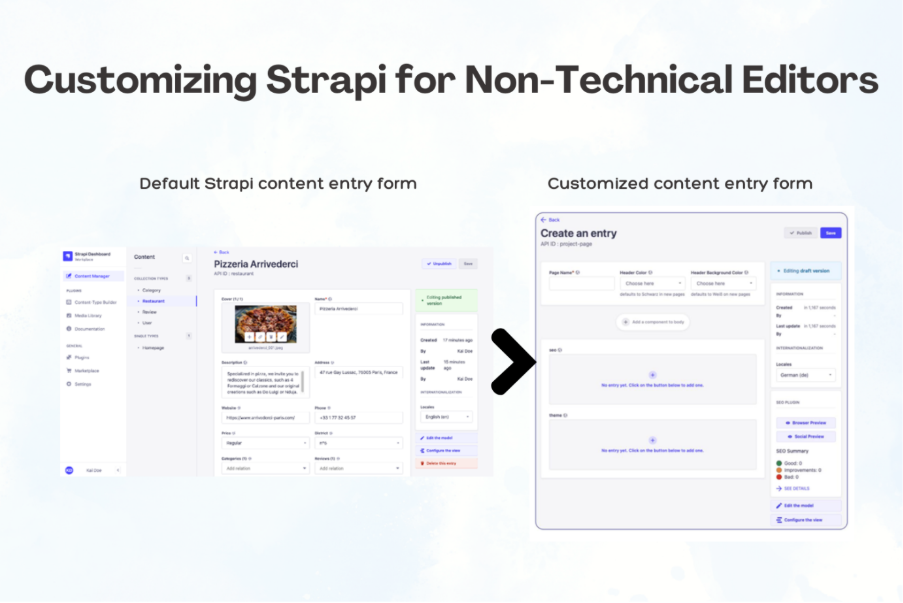
The above image shows what an optimized content entry form looks like where API slug and developer fields hidden from the editor role.
Here’s how you can achieve this in step-by-step order:
1. Reorder fields in Content-Type Builder
Drag the fields editors use most (title, body, image) to the top. Push technical fields (API slug, metadata, relations) to the bottom or a secondary tab. Strapi renders fields in the order you define them.
2. Write human-readable field descriptions
Every field in Strapi supports a description text. Use it. Instead of slug, write: “Auto-generated URL path; don’t edit.” This single change eliminates most accidental edits.
3. Use Enumeration fields instead of free-text where possible
Replacing open text fields with dropdowns (e.g., Category, Status, Region) prevents editors from entering inconsistent values that break queries or display logic downstream.
4. Leverage Conditional Fields (Strapi 5)
Strapi 5 introduced Conditional Fields in 2025 that show or hide dynamically based on another field’s value. Show “Video URL” only if “Content Type = Video.” Show “Event Date” only if “Post Type = Event.” This cuts field noise by 50–70% in complex schemas.
At OpenSpace Services, the single highest-leverage customization we’ve seen in client projects isn’t RBAC or theming; it’s field descriptions. Teams that add clear, plain-English descriptions to every field reduce editor support tickets by an estimated 60% in the first month. It costs 30 minutes to set up and pays back immediately.
What Is the Right Role-Based Access Control (RBAC) Setup for Strapi Content Teams?
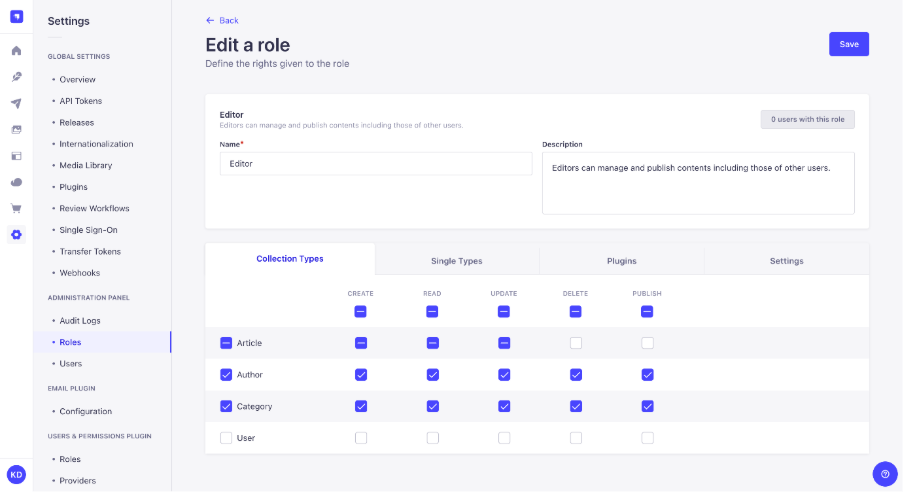
Source: Strapi
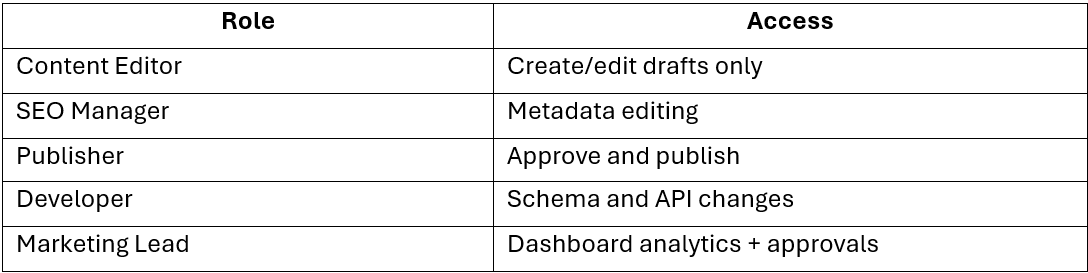
Strapi’s RBAC documentation defines three default roles out of the box: Author, Editor, and Super Admin.
While customizing Strapi for content editors, you’ll want to build on this with at least one or two custom roles. For teams still evaluating what a Strapi headless CMS architecture looks like, RBAC becomes one of the most important operational advantages of decoupled CMS systems.
Here’s what a well-configured permission matrix looks like:
Field-level permissions: a simple way to reduce editor mistakes
Most teams only set permissions at the content level. For example, deciding whether someone can edit Blog Posts or not.
But field-level permissions give much better control.
For example, a content writer can be allowed to edit only:
- Title
- Body Content
- Featured Image
While technical fields like:
- API Slug
- SEO Settings
- Publish Date
stay hidden or locked.
This makes the admin panel much easier for non-technical editors to use. It also prevents accidental changes to important technical settings, reducing publishing errors and developer support requests.
How Can You Build an Editor-Friendly Publishing Workflow in Strapi?
The biggest source of editor-developer friction isn't missing features; it’s unclear workflow states. “Is this ready to publish?” “Who approves it?” “What happens when I click Save vs. Publish?” Much like scalable product engineering, structured CMS workflows reduce operational friction and improve long-term maintainability across digital platforms.
These questions arise daily when the workflow isn't made explicit in the UI.
A practical 3-stage Strapi non-technical workflow for editors:
1. Draft stage: Author’s territory
Authors create content in Draft mode. They cannot publish. A simple “Submit for Review” boolean field triggers a notification (via webhook) to the Editor's queue. The Author sees a simplified form; no publish button in sight.
2. Review stage: Editor steps in
The Editor receives a notification, opens the draft, can edit any field, leave notes, and either send back (toggle “Needs Revision” flag) or approve. With Live Preview enabled, the Editor sees the rendered page before hitting Publish.
3. Published: no developer required
Editor hits Publish. Strapi sets publishedAt , the frontend revalidates via webhook, content goes live. No Slack message needed. No developer in the loop.
Contentstack’s case study on Burberry states that they saw an 80% increase in publishing speed after implementing a structured headless CMS workflow. It’s a pattern that applies directly to well-configured Strapi teams.
What Strapi 5 Features Matter Most for Non-Technical Teams in 2026?
Strapi 5 shipped several features in 2025 specifically aimed at bridging the developer-editor gap. Strapi's 2025 year in review confirmed that 2026 is dedicated to user experience improvements; meaning the editor-friendliness trajectory is accelerating.
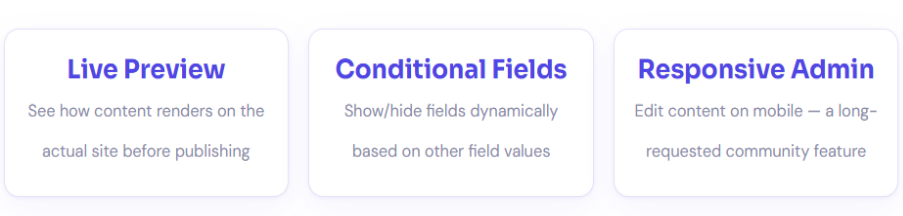
Conditional Fields here deserve special attention.
Before this feature, a complex content type might show 25 fields regardless of context, most of which were irrelevant for any given entry.
Now you can configure: “Show ‘Podcast Length’ only if Content Type = Podcast.”
“Show ‘Event Location’ only if ‘Is Virtual’ = false.”
The result? Editors see 5–8 relevant fields instead of 25 confusing ones.
Final Thoughts
Strapi is not inherently difficult for non-technical teams.
Most usability problems come from developer-centric implementations that prioritize schema flexibility over editorial clarity.
When technical teams use Strapi custom UI build around real publishing workflows, Strapi becomes significantly more powerful:
- editors gain independence,
- marketers publish faster,
- developers receive fewer support requests,
- and content operations scale more efficiently.
That is where thoughtful CMS architecture creates measurable business value. Businesses investing in scalable content operations often rely on custom Strapi CMS development solutions to simplify workflows, improve publishing efficiency, and support long-term growth.
Want an expert-configured Strapi setup for your team?
OpenSpace Services PVT LTD has helped dozens of teams transform their Strapi admin panels into editor-friendly content operations.
Contact us today! Let us audit your current setup and build the workflow your content team deserves.