


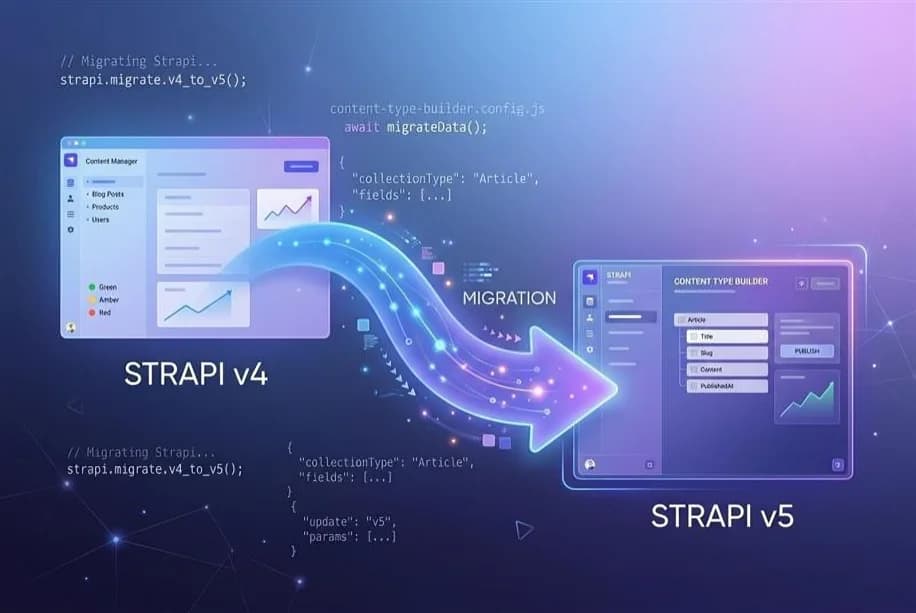
If you built on Strapi v4 for a client, a product, an internal tool, you already know the quality of the platform. That's exactly why the migration question is so uncomfortable. You have working infrastructure. You have data. You have frontend integrations. And now Strapi is telling you the foundation needs to be replaced.
But staying on v4 is no longer a choice. Official support ended in October 2025. Security patches run through April 2026. Beyond that, every unpatched CVE is yours alone to carry.
The good news: Strapi v5 migration, done methodically, is far cleaner than the v3→v4 jump. The codemods handle a substantial portion of the heavy lifting. The database migration runs automatically on first boot. And Strapi ships a retro-compatibility header so you can migrate your backend and frontend independently, at your own pace.
In this guide we cover everything: what actually changed, what broke, a migration checklist, the errors you will hit (and how to fix them), realistic timelines.
What matters most:
- Strapi v4 security patches expire April 2026; migration is not optional
- The biggest breaking change: Entity Service API replaced by Document Service API
- Flat API responses replace nested data.attributes wrapper; your frontend will need updates
- Numeric id replaced by persistent documentId across the API
- Automated codemods handle most boilerplate changes; custom code requires manual review
- Data migration runs automatically on first boot but always back up first
- Retro-compatibility headers allow phased frontend migration without big-bang rewrites
Also Read: how headless CMS architecture works for scalable applications.
What Changed in Strapi v5? Key Strapi Breaking Changes 2026
Strapi v5 is not just an upgrade. It is a shift in how the Strapi CMS thinks about content and APIs.
At its core, this release focuses on consistency, performance, and scalability — making it more aligned with modern enterprise-grade headless CMS Strapi implementations.
1. From Entity Service to Document Service API
The biggest change in Strapi v5 is the replacement of the Entity Service API with the Document Service API, which fundamentally changes how content is queried, created, and managed.
In v4, most custom logic relied on: strapi.entityService
In v5, this is replaced with the Document Service API, which changes how content is queried, created, and managed.
This directly impacts:
- Custom controllers
- Backend services
- Plugins
- Lifecycle hooks
If your project includes custom logic, this is not a plug-and-play migration. It requires refactoring.
2. Flattened API Response Format
This is the change most likely to break your frontend immediately. In v4, every REST API response wrapped user fields inside a data.attributes object. In v5, the response is flat meaning user fields sit directly alongside system fields.
Compare:
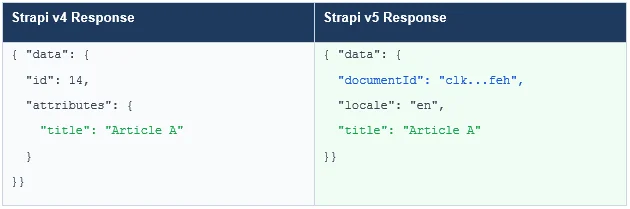
Strapi provides a backward-compatibility header. Add Strapi-Response-Format: v4 to your REST requests to get the old format while you refactor your frontend. For GraphQL, set v4CompatibilityMode: true in your plugin config. This phased approach is your best friend during the transition.
Other Changes:
- TypeScript-first: Full TypeScript support with pure type names, better namespacing, and auto-generated types for content types and components.
- Vite replaces Webpack: The admin panel now builds with Vite dramatically faster rebuilds and local development cycles.
- New Plugin SDK: A dedicated CLI for building and scaffolding plugins, replacing the ad-hoc helper-plugin dependency which has been fully removed.
- MySQL v5 dropped: Only MySQL v8+ (via mysql2) is supported. SQLite users must switch from the old driver to better-sqlite3.
- Draft & Publish rearchitected: The publicationState query param is gone. Use the new status param with values draft or published.
- Apollo Server v3 → v4: GraphQL projects must update their Apollo dependencies and handle breaking changes introduced by Apollo v4.
- AI-assisted content management: Strapi v5 introduces AI-assisted content type generation and Figma import.
Paul Bratslavsk, Developer Advocate at Strapi, says:
"Upgrading from v3 to v4 was, to put it mildly, a challenging process. This transition feels more like a natural evolution. All breaking changes have been thoroughly documented, and some can even be addressed automatically using the provided codemod.”
Comparison: Strapi v4 vs v5 Feature & API
To make these changes easier to digest, here’s a side-by-side comparison of how Strapi v4 and v5 differ across key areas:
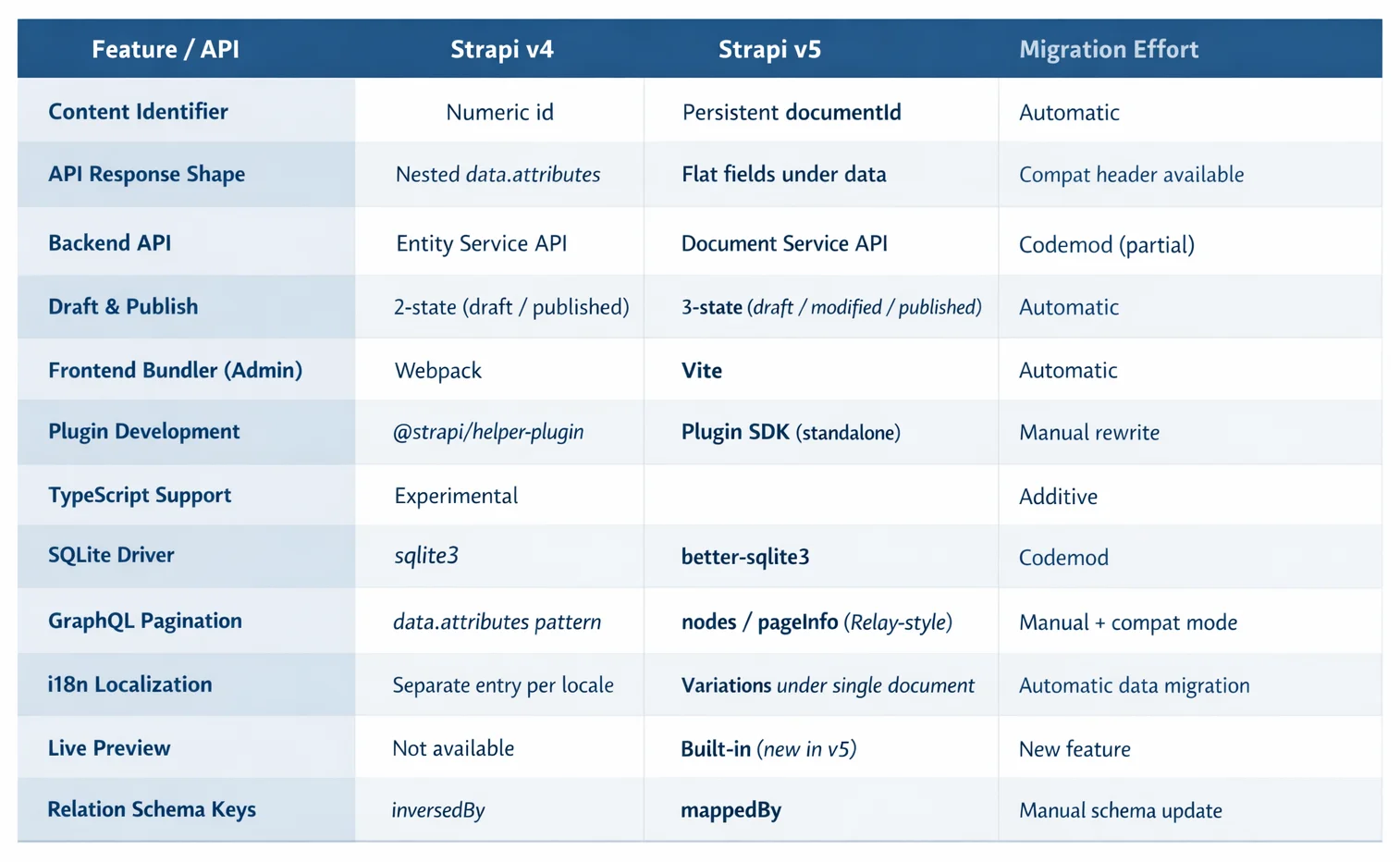
While these changes may seem disruptive, Strapi provides a key safety net…
The Retro-Compatibility Safety Net
Add the Strapi-Response-Format: v4 header to your REST API calls and your frontend will continue receiving the nested data.attributes format while you refactor. For GraphQL, set v4CompatibilityMode: true in your plugin config. This buys you runway to migrate the frontend independently.
Also Read: Complete Beginner's Guide to Strapi CMS in 2026
Is Your Project a Good Candidate for v5 Migration?
Now that you understand what changed, the next question is: how much will this impact your project?
Before you spin up a staging branch and run the upgrade CLI, you need an honest audit of your codebase. Answer these questions:
- How much custom backend code do you have?
Custom controllers, services, and policies that call strapi.entityService.* will all need updates to use strapi.documents().*. The codemods will partially handle this but will leave __TODO__ markers wherever it can't auto-resolve an entityId → documentId mapping.
- Do you have custom plugins or third-party plugins?
Strapi v4 plugins using helper-plugin imports or the old Entity Service will be broken in v5. Audit every plugin on the Strapi Marketplace before proceeding.
- Is your database MySQL v5?
It's no longer supported. You'll need to upgrade your MySQL instance to v8+ before migrating.
- Are you on SQLite with the legacy driver?
Switch to better-sqlite3 as part of this migration.
- How complex is your frontend API consumption?
If your React, Next.js, Vue, or mobile app relies on the data.attributes response shape, every data-fetching call needs updating. The Strapi-Response-Format: v4 compatibility header is your safety net here; use it to keep your frontend functional during a phased migration.
- Do you use GraphQL?
GraphQL responses also changed significantly. id is replaced by documentId in queries, and the _connection query pattern is deprecated. Enable v4CompatibilityMode and update queries incrementally.
Note: If you have a content type called documents or a field named filters, these collide with v5’s new Document System internals. You'll need to rename them in v4, migrate the data manually, and then run the v5 upgrade.
Step-by-Step Strapi v5 Migration Flow
Here’s how you can migrate to v5 without any data loss and keep your frontend running during the Strapi v4 to v5 upgrade. Follow it in order.
Step 1: Prepare: Update v4 to Latest Patch + Back Up Everything
Run npm update or npx @strapi/upgrade minor to bring your v4 project to its latest patch release. Then back up your database. Strapi v5 does not support down migrations. If the migration fails mid-way, your backup is the only recovery path.
# SQLite backup
cp .tmp/data.db .tmp/data.db.bak
# Export via DTS (all databases)
npm run strapi export -- --no-encrypt -f v4-backup
Also: create a dedicated git branch: git checkout -b migrate/v4-to-v5.
Step 2: Audit Plugins Before Writing a Single Line of v5 Code
List every plugin in your project. For each one, check market.strapi.io for a v5-compatible release. v4 plugins are not forward-compatible. Remove or replace any plugin without a v5 version before proceeding.
cat package.json | grep @strapi
Step 3: Run the Official Upgrade CLI
This single command installs v5 dependencies and runs codemods across your codebase:
npx @strapi/upgrade major
The CLI will: update package.json to v5 packages, convert Entity Service calls to Document Service syntax, and handle some helper-plugin deprecations. After it runs, search your codebase for __TODO__ each one marks a place that needs manual resolution.
Step 4: Fix __TODO__ Items: Resolve entityId → documentId Manually
The codemod cannot automatically convert numeric entityId values to their corresponding documentId strings; it doesn’t know your data. For each __TODO__, consult your migrated database:
SELECT id, document_id FROM your_table;
Update hardcoded IDs, API call parameters, and relation references to use documentId throughout.
Step 5: Run the Database Migration (Staging First)
In your staging environment, run:
yarn develop (or npm run develop)
Strapi v5 automatically runs its built-in data migration scripts on first boot including 5.0.0-02-created-document-id, which assigns documentId values to all existing content. Watch the console carefully. If it hangs or errors, run yarn develop --debug for the full log.
Step 6: Decouple Frontend Migration Using Compatibility Mode
Add Strapi-Response-Format: v4 to all your REST API calls immediately. This keeps your frontend working while you migrate it endpoint by endpoint.
For GraphQL: set v4CompatibilityMode: true in /config/plugins.js. Then migrate each query incrementally — replace data { attributes { ... } } with nodes { ... } and swap id → documentId.
Step 7: Verify Data Integrity + Deploy to Production
Run automated checks: compare record counts, relation integrity, locale completeness, and media references between your v4 backup and the v5 database. Only deploy to production after all checks pass.
Remove the Strapi-Response-Format: v4 header per endpoint as each API consumer is validated. When all consumers are updated, disable compatibility mode entirely.
Use Strapi’s step-by-step v5 migration guide for the full walkthrough, then return here before upgrading to follow this checklist and avoid common mistakes.
Strapi v4 to v5 Migration Checklist at a Glance
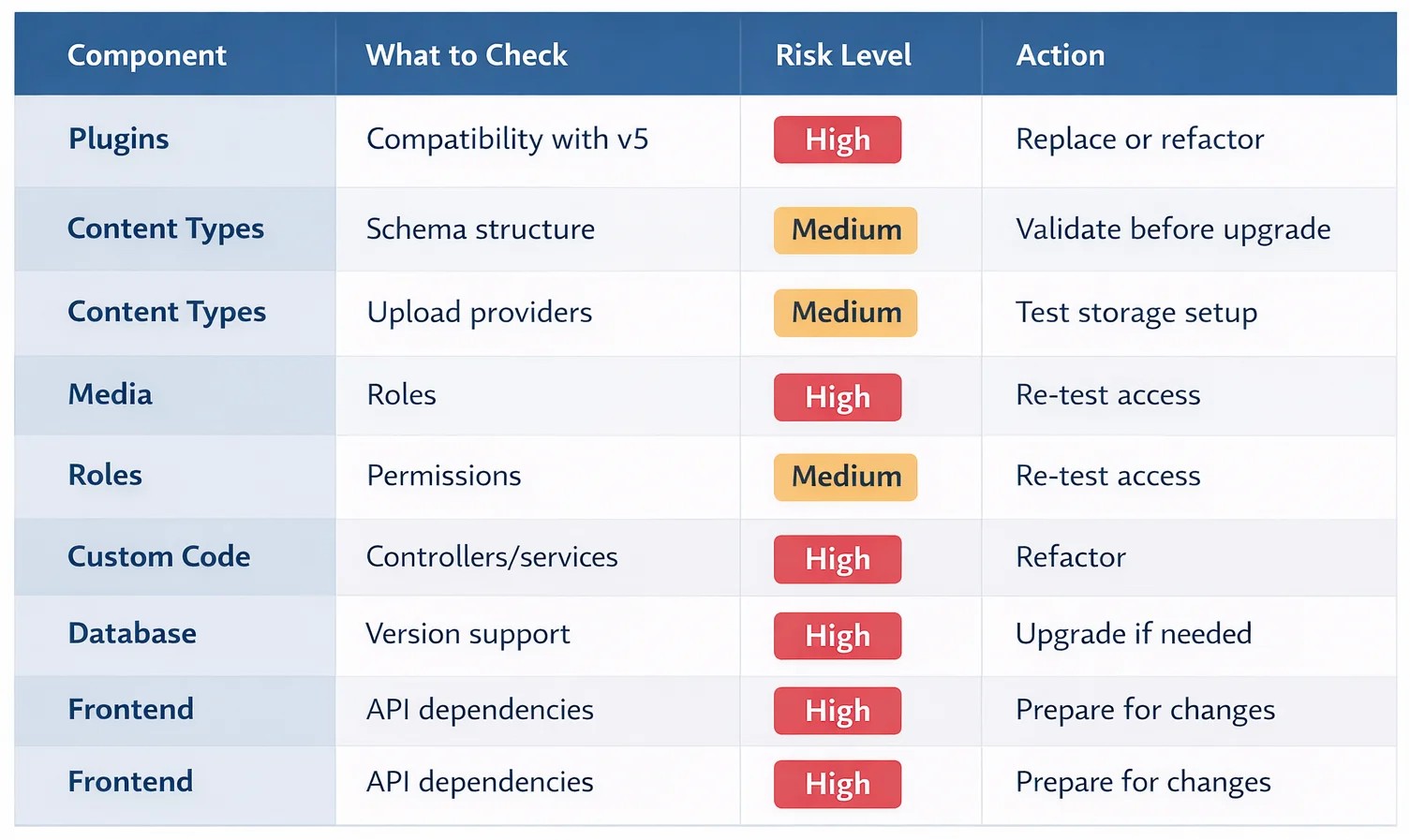
Common Migration Errors & How You can Easily Fix Them
These are the most common issues reported in Strapi’s GitHub, forums, and Discord, and are recognised by the Strapi’s engineering team. But in almost every case, the pain traced back to specific, fixable causes not to the migration being fundamentally broken.
Error 1: “Everything upgraded, but the front end is broken”
Cause: Your UI still expects data.attributes or numeric id.
Fix: Turn on the Strapi-Response-Format: v4 header for REST consumers, then migrate endpoints one by one to v5’s flattened shape and documentId.
Error 2: Custom controllers or services fail after upgrade
Cause: Entity Service API usage or lifecycle assumptions no longer hold.
Fix: Refactor toward Document Service API and review lifecycle behavior because hooks trigger differently in v5.
Error 3: Plugin/admin customization suddenly breaks
Cause: helper-plugin removal, admin API refactors, design system changes.
Fix: Treat admin customizations as a mini-project. Codemods help partially, but manual rewriting is common.
Error 4: SQLite or MySQL environment fails on boot
Cause: Old DB driver/version assumptions.
Fix: For SQLite, move to better-sqlite3. For MySQL, ensure supported versions and mysql2 usage.
Error 5: Upgrade tool runs, but edge cases remain
Cause: The tool does not move files, redesign your architecture, or migrate every custom pattern.
Fix: Run a dry run first, inspect added __TODO__ comments, and manually verify every modified file before booting v5 in staging.
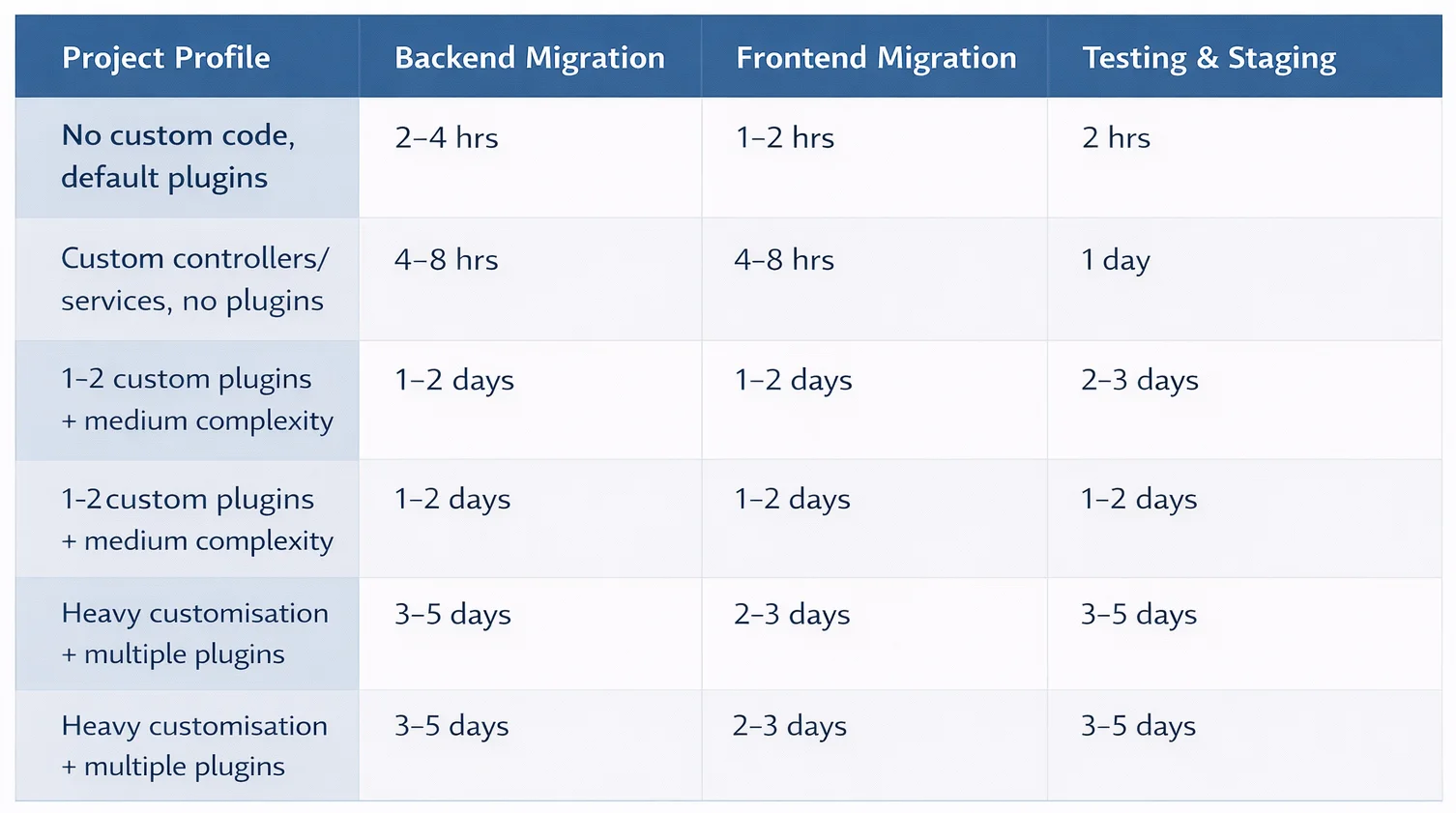
How Long Does Strapi v5 Migration Take?
It depends almost entirely on how much custom code you have. The database migration itself is automatic and typically fast. The real timeline driver is code surface area: custom plugins, admin extensions, front-end assumptions, and QA sign-off.
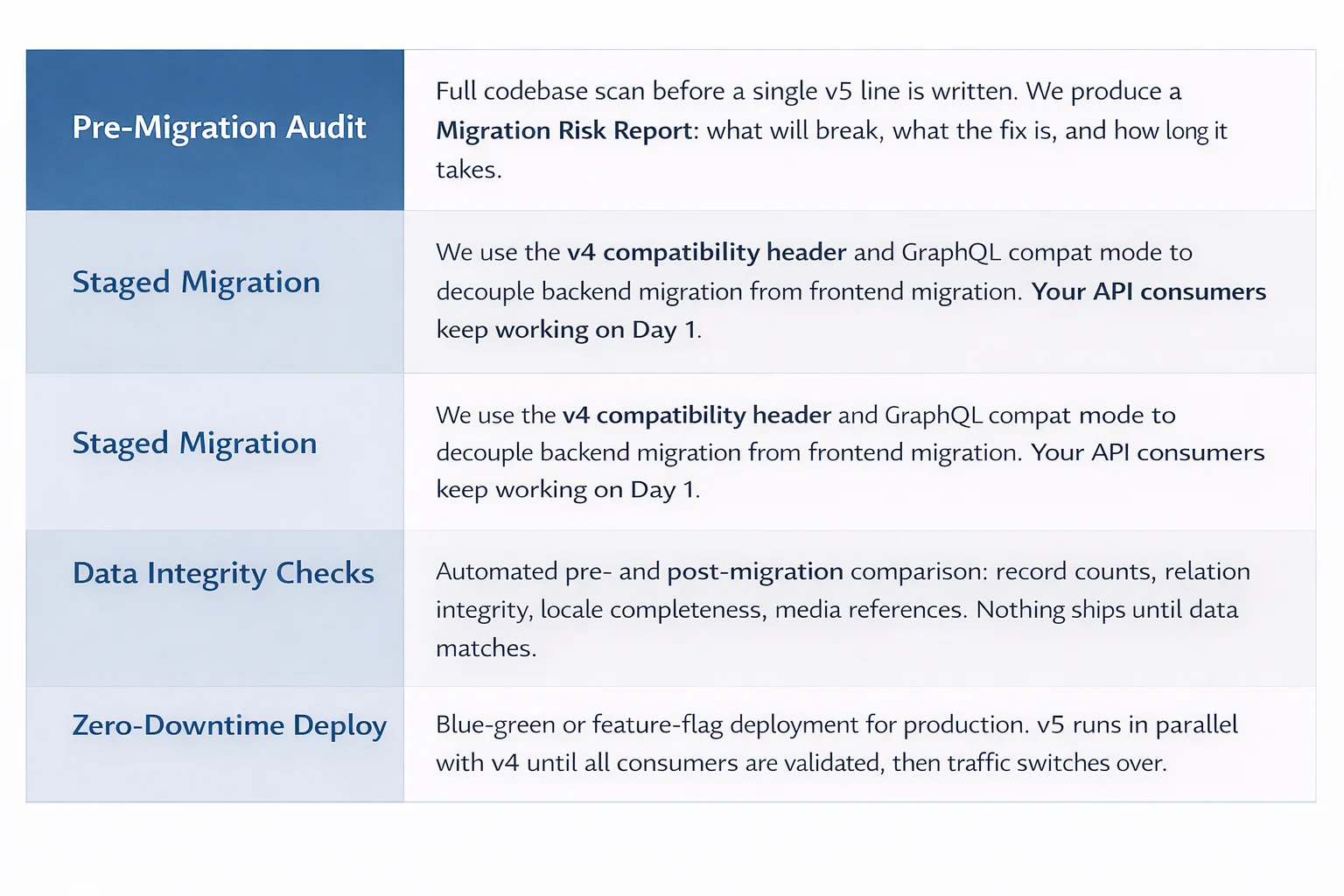
Strapi v4 to v5 Migration at OpenSpace Solutions
At OpenSpace Services (OSSPL), our expert Strapi team runs a structured Strapi Migration Framework built around four principles that address the most common v5 migration failure points:
Final Thoughts
Strapi v5 migration isn’t about chasing the latest version; it’s about making sure your system stays stable, secure, and future-ready without breaking what already works.
The key is to start with visibility, use compatibility modes where needed, and move your frontend and backend independently. That’s how you protect your data, your uptime, and your team’s sanity.
If your project involves custom code, plugins, or production dependencies, working with a team experienced in Strapi headless CMS consulting ensures a smooth transition without disruption
At Openspace Solutions (OSSPL), we help teams upgrade to Strapi v5 with structured rollouts, zero-data-loss workflows, and production-safe deployments, so you’re not figuring it out mid-migration.
Talk to our team for a tailored Strapi v5 migration plan that fits your stack, timeline, and risk level.