

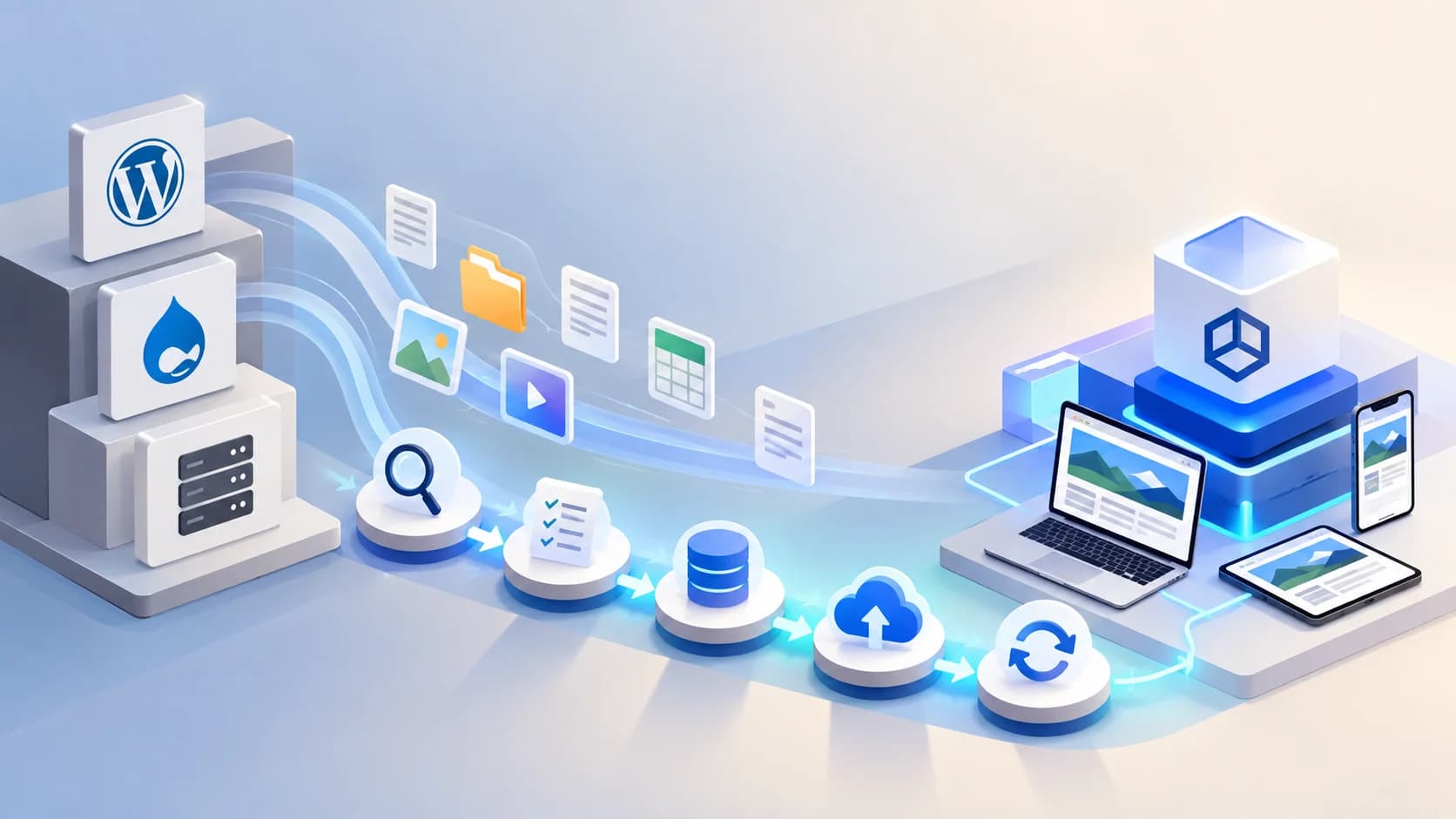
Quick answer: Replatforming means moving your website's content and features from an older CMS, such as WordPress or Drupal, to a headless setup. A safe migration runs in clear phases: audit, content modelling, build, migration, testing, launch and monitoring. The single most important SEO step is mapping every old URL to its new home with a permanent redirect.
I've sat in a lot of first meetings about CMS changes. The opening line is almost always some version of "we know we need to move, we're just scared of breaking things." Fair enough. Your website is probably your biggest sales channel, and nobody wants to explain a traffic drop to the board.
The good news is that CMS replatforming follows a structured process when the right planning is in place. This guide covers the decisions, risks and steps involved in a WordPress-to-headless CMS migration, a Drupal migration or a move from another legacy platform. If you're considering Strapi, Strapi CMS development services can help you plan the content model, migration workflow, integrations and ongoing support required for the new platform.
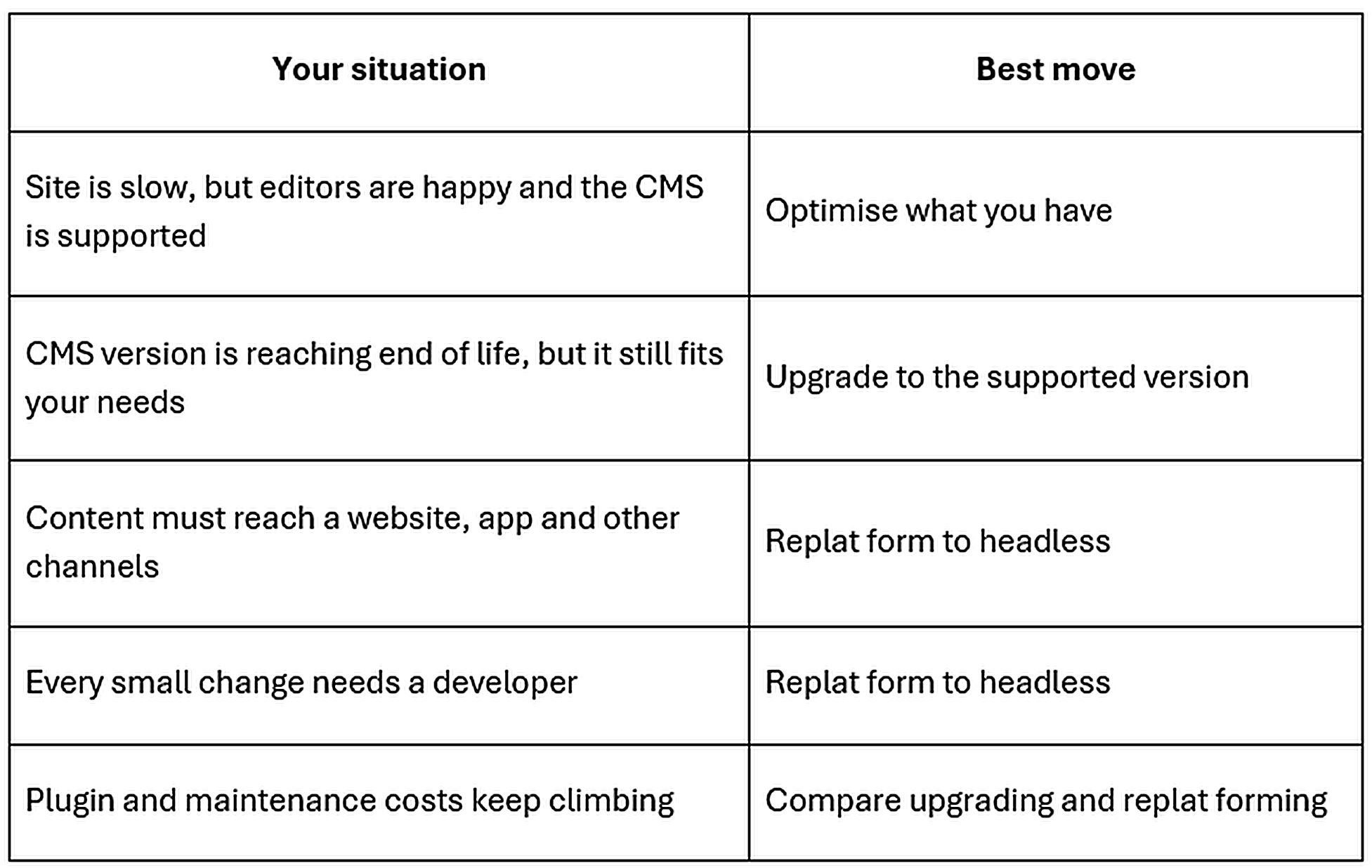
Should You Optimise, Upgrade or Replatform?
Not every website needs to move to a new CMS. If your current platform still meets your needs, optimisation or an upgrade may be the more practical choice. Replatforming becomes worth considering when the existing architecture limits content delivery, publishing workflows or future growth. Read our guide to why growing businesses consider a headless CMSto understand when this architecture makes sense and when a traditional CMS may still be the better option.
"A CMS migration is a business decision that happens to involve code. If the only reason is 'headless sounds modern,' I'll tell a client to wait. If their marketing team can't launch a campaign page without a ticket, that's a different conversation." Niket Shah, Founder, OpenSpace Services
For many teams, the trigger is simple: Their editors spend more time waiting than publishing. That's usually the clearest sign that legacy CMS modernizationwill pay off.
What do the Drupal End-of-Life Dates Mean for You?
According to Drupal.org's release schedule, Drupal 7 reached end of life on 5 January 2025, and Drupal 10 reaches end of life on 9 December 2026. If your site runs on a Drupal version approaching end of life, assess whether an upgrade or a broader migration better fits your roadmap. A Drupal-to-headless migration may be worth considering if you're already planning a redesign, introducing new channels or restructuring your content model. CMS development services can help you assess the existing platform, migration scope and integration requirements before committing to a route.
Which is right? If your Drupal site is heavily customised and your team loves the editor, upgrading is usually the shorter path. If you're already planning a redesign or a new channel, replatforming avoids paying for two big projects in a row.
Big-Bang or Phased: Which Migration Approach Fits?
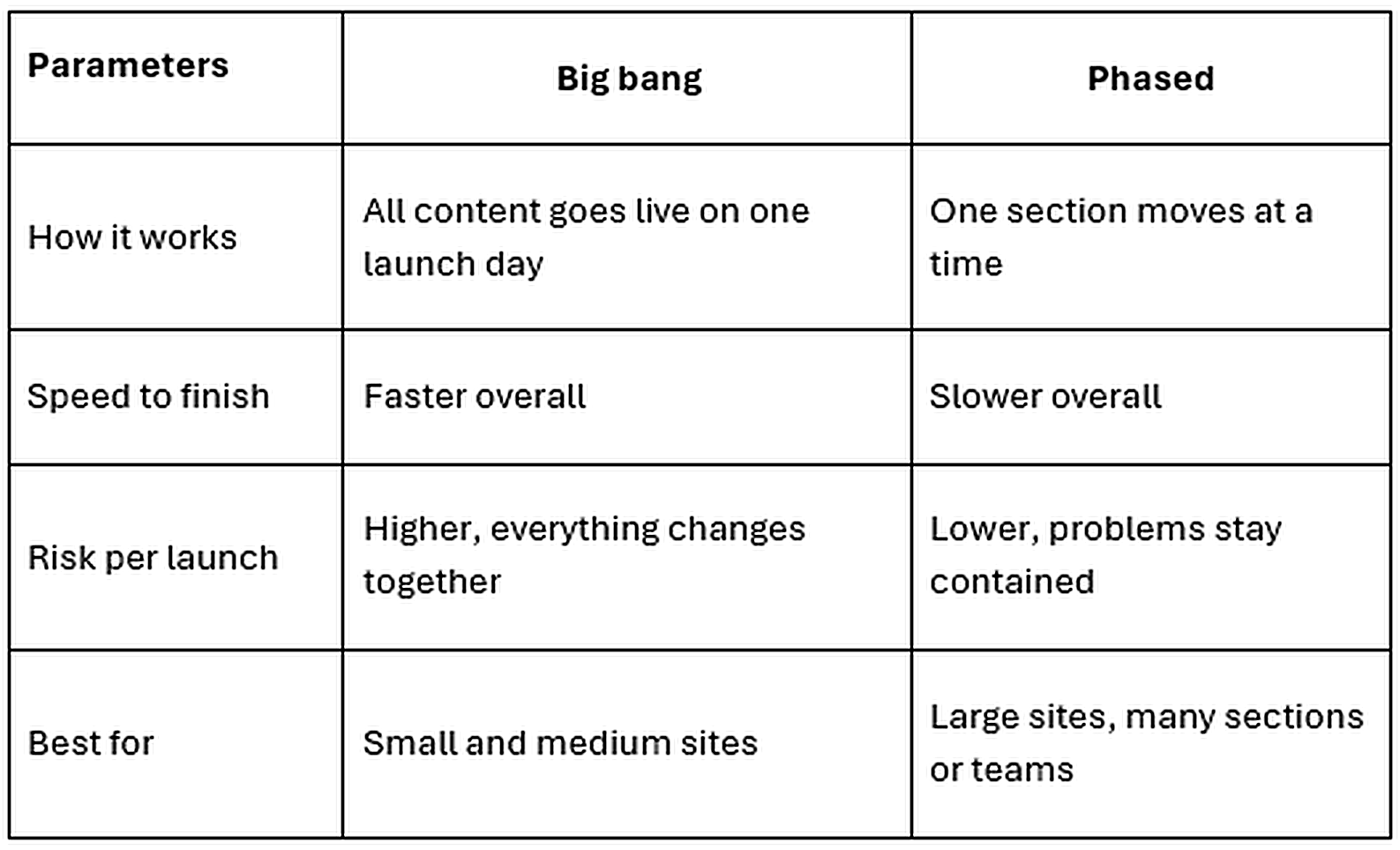
A big-bang migration moves the whole site at once. A phased migration moves it section by section. Google's site move guidance suggests that small and medium sites move all at once, while large sites can move one section at a time.
The old advice was always to launch everything at once and get it over with. That made sense when running two platforms side by side was hard. Now a reverse proxy can serve old and new sections under one domain, so visitors never notice which system answered their click.
How do You Migrate Content and Data Without Losing Anything?
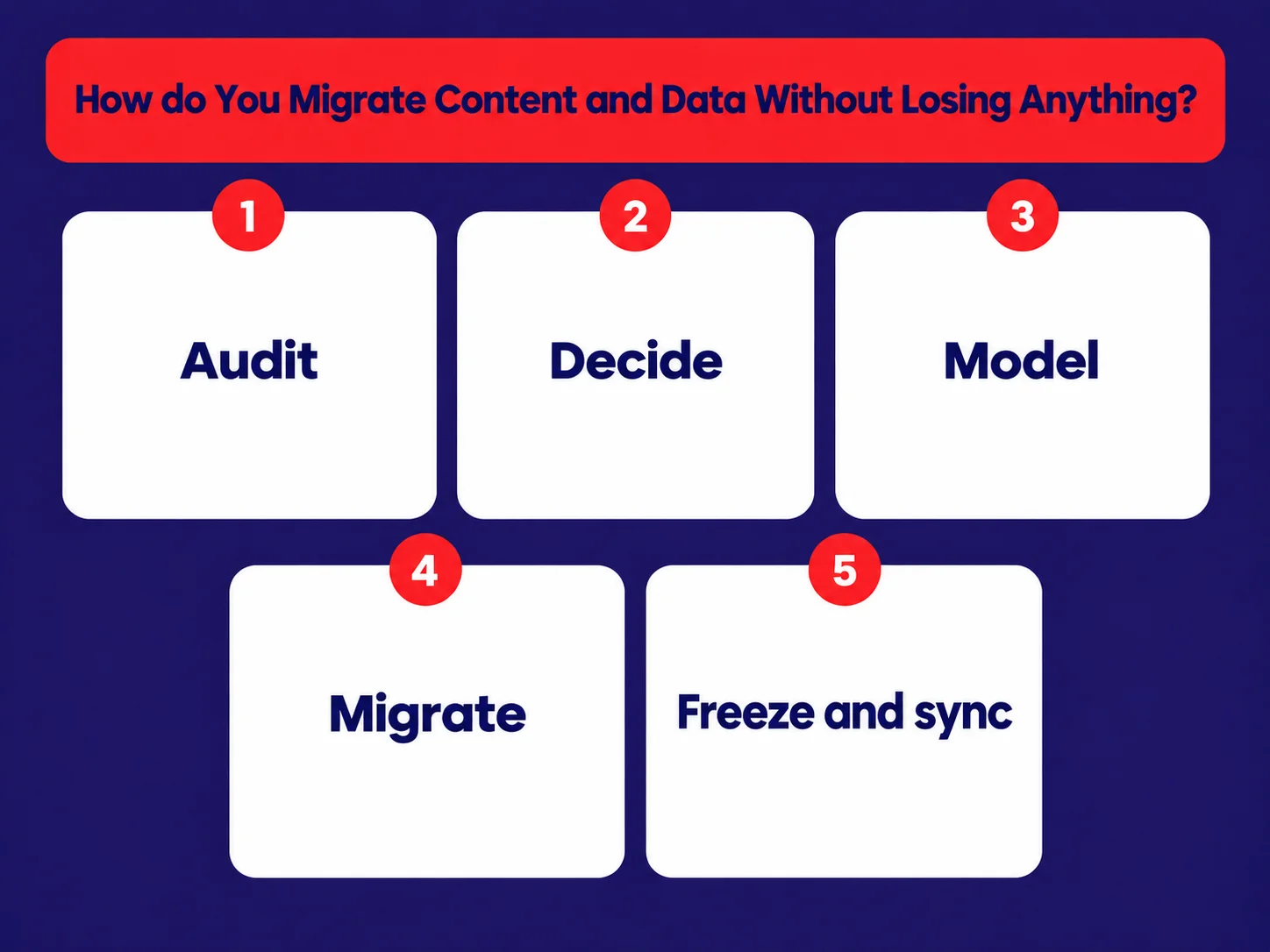
Start with an audit, not an export. Decide which content to keep, merge or retire before moving anything to the new platform. If your project also involves upgrading an existing Strapi installation, our guide to Strapi v4 to v5 migration risks and fixes explains how to approach breaking changes, data integrity checks and frontend compatibility.
- Audit: list every page, post, file and form, with its traffic
- Decide: keep, merge or retire each item
- Model: turn page types into structured fields, such as "product" or "case study"
- Migrate: move content with scripts, then spot-check by hand
- Freeze and sync: pause big edits near launch, and copy any late changes across
That last step is where marketing teams get nervous. "Do we have to stop publishing for a month?" No. A short freeze on structural changes is enough. Anything published during the build is copied across in a final sync, called a delta sync, just before launch.
For a WordPress-to-Strapi migration, posts, pages, categories and media must be mapped to the appropriate content types and fields. Custom fields, page-builder layouts, relationships and media references require particular attention because they rarely map one to one. If you're still evaluating Strapi's architecture and implementation requirements, read our complete guide to Strapi CMS before finalising your migration plan.
How do You Protect SEO During a CMS Migration?
Map every old URL to its new equivalent, and use permanent server-side redirects (301 or 308). Google's site move guidance says permanent redirects don't cause a loss in PageRank, and recommends keeping them for at least a year.
The old advice was to redirect anything you weren't sure about to the home page. That's wrong. Google specifically warns against sending many old pages to one irrelevant URL. Every page should go to its closest match.
The redirect map is the most boring spreadsheet in the whole project, and the most valuable. I'd rather spend two extra days on it than two months explaining a traffic dip.
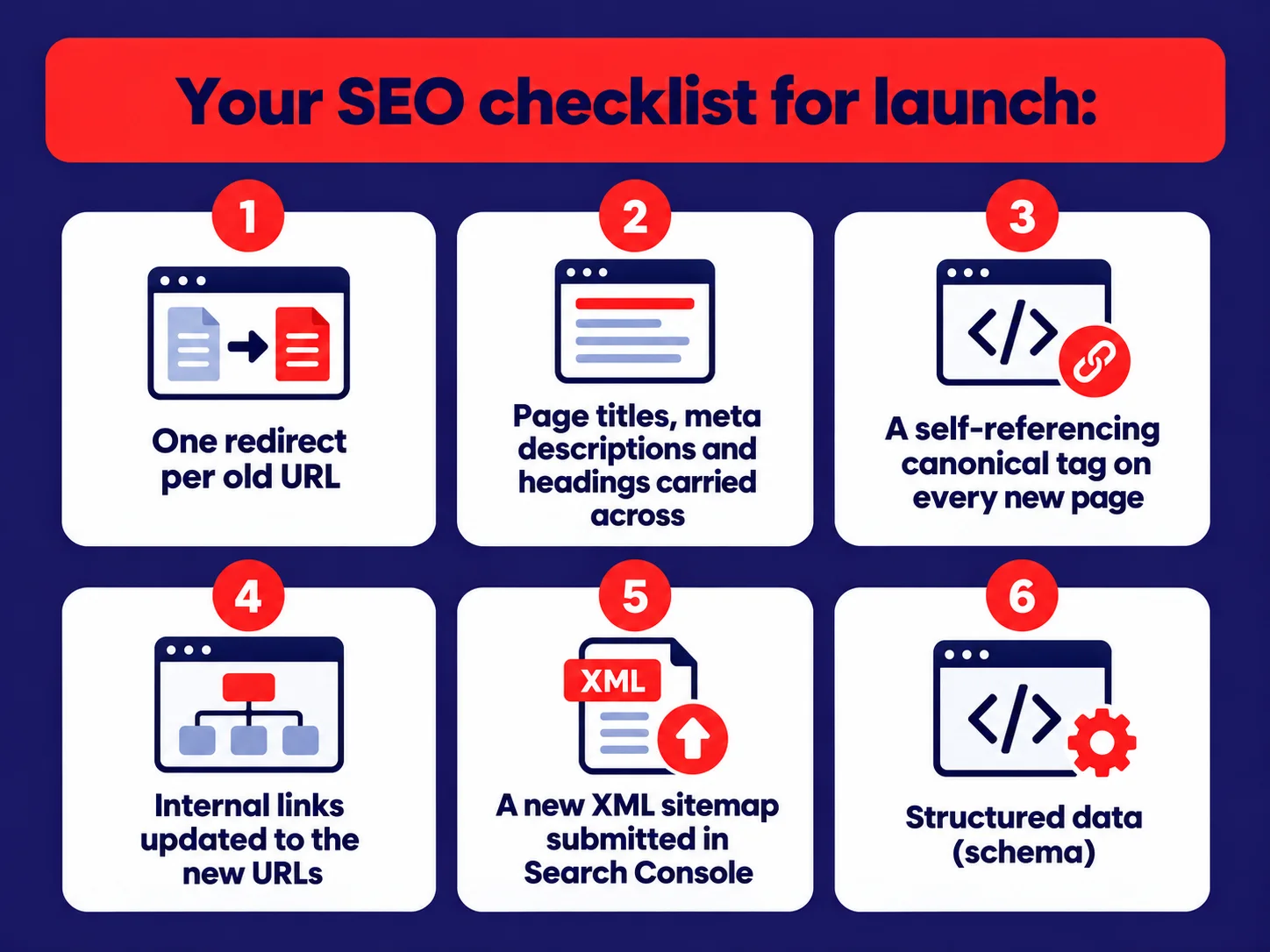
Will rankings move anyway? A little, for a while. Google says it can take "a few weeks or more" for a medium-sized site to be fully recrawled, and longer for large sites. Some movement during that window is normal, and it settles as Google processes the redirects.
How do You Protect Visibility in AI Search During a Migration?
Treat AI answer engines the way you treat Google: keep your best answers easy to find and read. A headless migration is actually a good chance to improve here, because structured content is easier for AI systems to understand.
- Keep answer-first content, such as FAQs and short summaries, on every key page
- Render pages on the server, so content is visible without running JavaScript
- Carry FAQ, product and organisation schema across to the new templates
- Keep author names and dates on articles
Our post onmaking your website ready for AI agents goes deeper on this.
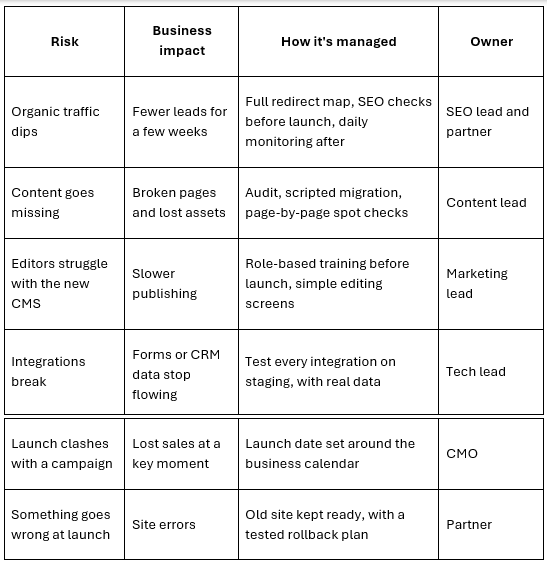
What are the Business Risks, and How are They Managed?
Every migration risk needs a clear owner, a mitigation plan and a way to measure whether the solution is working. Before committing to a new platform, enterprise teams should also assess content governance, scalability, editorial workflows and long-term operational ownership. Our guide to choosing Strapi for an enterprise CMS explains the key factors to evaluate when modernising an existing content platform.
How Long does a Headless Migration Take?
It depends on the size of the site, the number of integrations and how quickly decisions get made. Most projects move through the same phases, and decisions, not code, are usually what sets the pace.
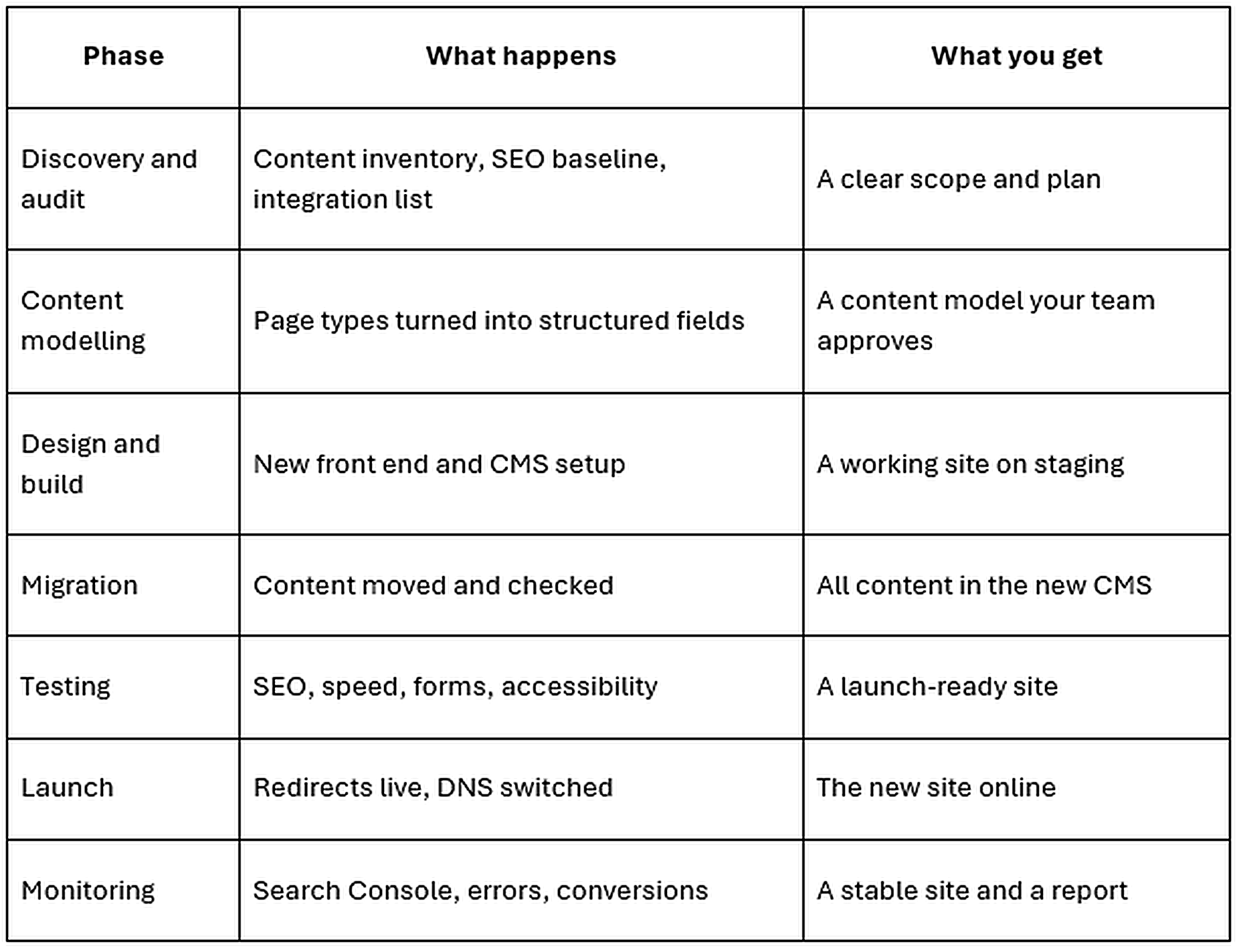
During the build phase, the new frontend and CMS must be designed to work together while keeping content delivery, rendering and publishing workflows reliable. If your planned architecture uses Strapi with Next.js, read our Strapi and Next.js integration guide for an overview of the architecture and implementation decisions involved.
What speeds things up? A content audit done early, one decision-maker per area, and approved designs before the build starts. What slows things down? New feature ideas arriving mid-build. They're welcome, but they belong in phase two.
What Drives theCost of a CMS Migration?
The headless CMS migration cost depends mostly on scope, not on the CMS licence. These are the factors that move the number most:
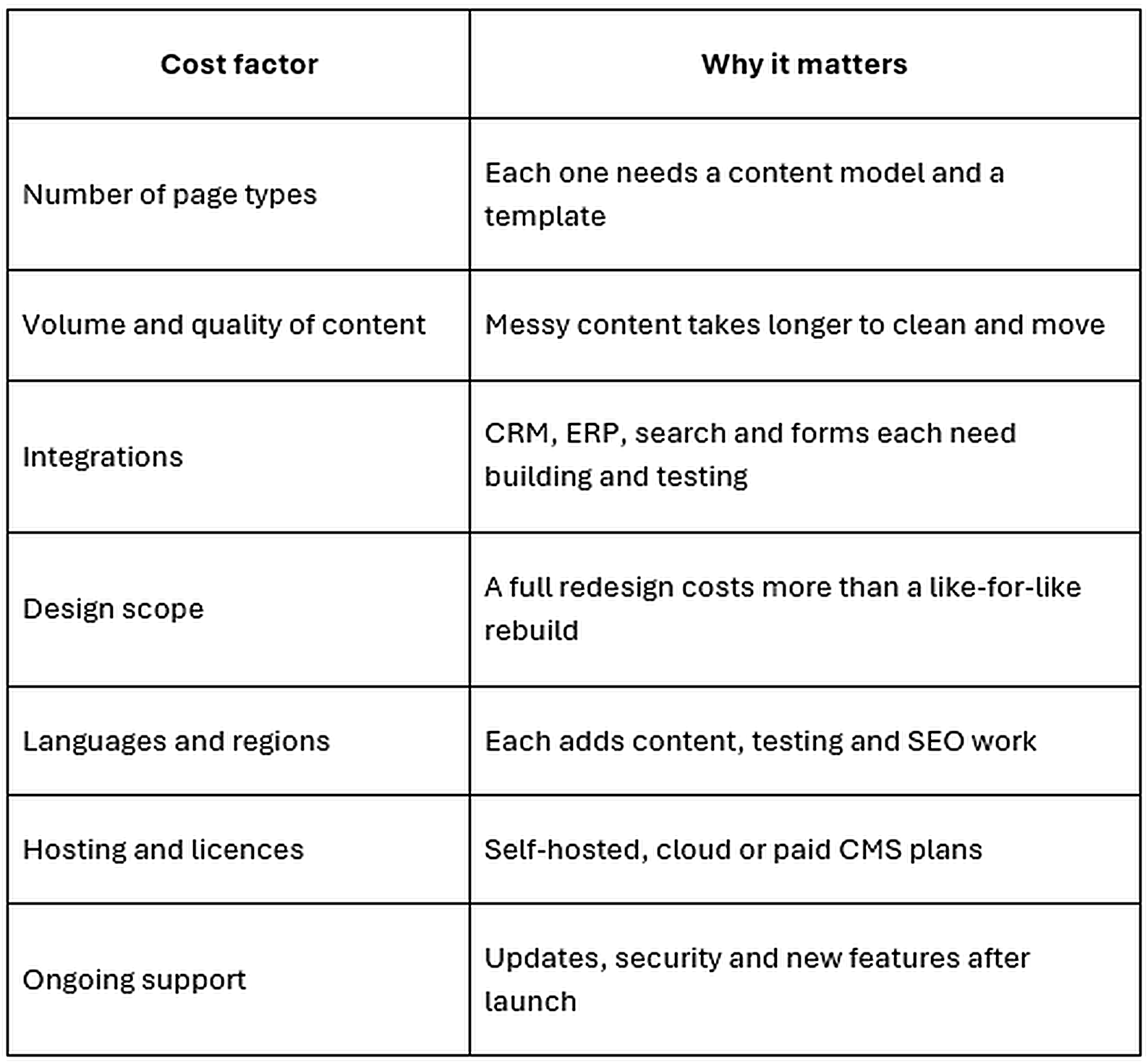
The quickest way to get a reliable figure is a short assessment. It turns these factors into a real scope before you commit to a budget.
When is the Best Time to Launch?
Launch in your quietest period, never during peak sales, quarter-end or a big campaign. Avoid Fridays too, so your team is around if anything needs fixing.
"I've never had a client regret launching a week later than planned. I've had plenty who wished they hadn't launched the week of their biggest trade show." Niket Shah, Founder, OpenSpace Services
Keep the old site ready to switch back to for a short window after launch. You'll very likely never use it. But knowing it's there makes launch day calmer for everyone.
What Should You Check in the First 90 Days After Launch?
Watch search performance, errors and conversions closely for the first few weeks, then weekly until the numbers settle.
- Search Console:Indexing, crawl errors and any spike in 404s
- Redirects:Old URLs still getting traffic all land in the right place
- Speed: Core Web Vitals on key pages
- Conversions:Forms, sign-ups and enquiries, compared with your baseline
- Editors:What's slow or confusing, so it can be fixed early
Migration Readiness Checklist
Use this CMS migration checklist before kick-off. If you can tick most of it, you're ready to start.
- We know why we're migrating, in business terms
- We have a full list of pages, files and forms, with traffic data
- We've decided what to keep, merge or retire
- We have an SEO baseline: rankings, traffic and top pages
- We've listed every integration, such as CRM, analytics and search
- We've named one owner for content, one for tech and one for SEO
- We've picked a launch window outside our busy periods
- We have a rollback plan
- We've planned training for editors
How do You Choose a Migration Partner?
Look for a partner who starts with your content and SEO, not with the technology. Strong CMS migration services cover the audit, redirect mapping, editor training and post-launch monitoring, not just the build.
Questions worth asking any partner, including us:
- How do you build and test the redirect map?
- What does your post-launch monitoring cover, and for how long?
- Will we own the code, the CMS and all accounts?
- How do you keep marketing publishing during the migration?
- When would you tell us not to replatform?
Where Should You Start?
Export a list of your top 50 pages by organic traffic. Those pages carry most of your search value. If you know exactly where each one will live on the new site, you've already done the hardest part of planning a WordPress to headless CMS migration.
When you're ready, request a CMS migration assessment from OpenSpace Services. Our team can review your current platform, content structure, integrations and SEO requirements to help define a practical migration plan. Businesses evaluating Strapi CMS development services in the USA can discuss their migration scope, content model, implementation timeline and post-launch support with our team.